


 English
  Tiếng Việt
 Wifi is a wireless network that has become very popular in our lives due to its convenience. However, there are often many errors related to it. The most common error is when connecting to wifi, it shows a Limited Access error, preventing our computers from accessing the network. The following article will solve all the problemsWifi Limited Access.
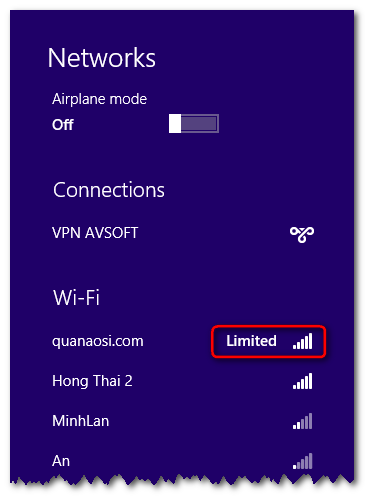
How to fix wifi limited, restricted connection, wifi icon with an exclamation mark and unable to access the network
Method 1: Restart the wifi device
First, when encountering this error, you should restart your wifi device. The restart process is very simple: just unplug the power (turn off the device) and then plug it back in. If you still find that it hasn't been fixed, press the reset button to restore the device to its default settings (press and hold for about 5 - 10 seconds). Then, reconnect to wifi to see if it works. If not, try the method below.
Method 2: Change the computer's IP address
Another reason could be that the DHCP is assigning an incorrect IP address, causing the Limited error. If so, follow these steps:
Exit to the Desktop and press the Windows + X key combination, then select Command Prompt. In the cmd window that appears, type two simple commands.
- ipconfig elease
- ipconfig enew
You have now successfully requested a new IP address. If there is still no change, move on to the next method.

>>>No worries about encountering the Limited Access error when using:4G SIM wifi hotspot device
Method 3: Set up a static IP address or dynamic IP address
If the above two methods haven't resolved the issue, try changing your computer's IP to a static IP. To do this, you need to know the available IP range that the DHCP can assign, along with the Default Gateway, to set it up. You can find this by checking the settings of another computer on the same network.
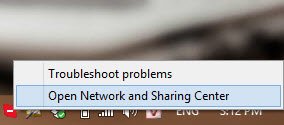
Step 1: Click on the wifi network icon, selectNetwork and sharing center.
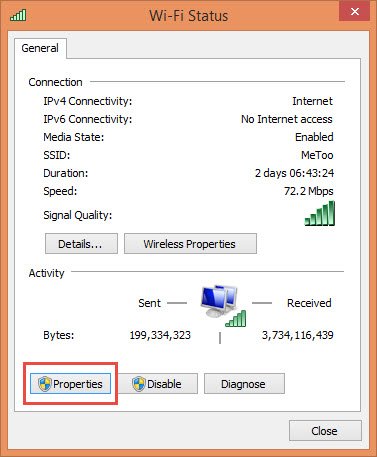
Step 2: Click on the network you are currently using, then select Properties.
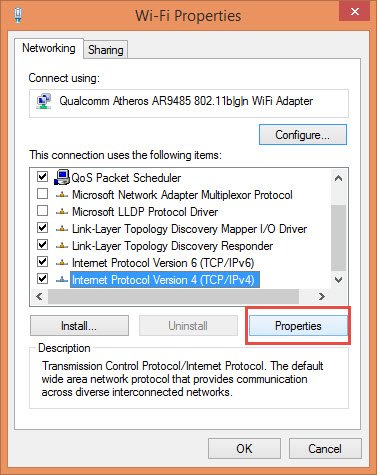
Step 3: Select Internet Protocol Version 4 and then select Properties.
Step 4: In the system table, enter the parameters. For example:
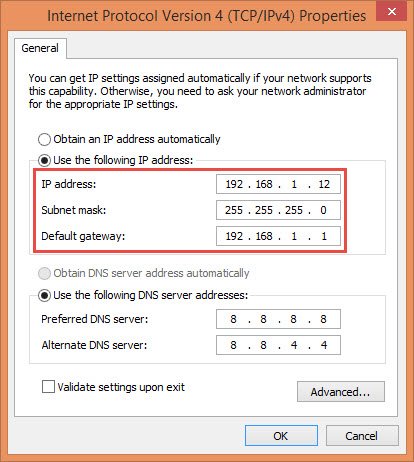
Note LineIP Address: depends on each network how to fill differently.If your wifi router has errors, you canbuy cheap 4g usbto be able to use the internet anytime, anywhere.
Hope the information shared above will help you solve the problemwifi limit access. We look forward to your support in future articles.





