


 English
  Tiếng Việt
 - 1. How to fix the causecomputer cannot connect to wifi
- 1.1. Error setting incorrect DNS and IP addresses causing wifi to have an exclamation mark
- 1.2. How to fix wifi with an exclamation mark error on a laptop
- 1.2.1. Turn off the firewall on your computer
- 1.2.2. Change the Internet Network Address
- 1.2.3. Change the Wi-Fi network mode selection
- 1.2.4. Restart Wireless Zero Configuration
- 1.2.5. Create a new IP address for the computer
- 1.3. Error: WiFi network name not found on laptop
- 1.4. Wifi on the laptop only has 1 bar
- 1.5. Forgot or lost wifi password
- 1.6. Fixing the Wifi Acquiring Network Address error (There is wifi but cannot access the internet)
- 1.7. Error with red X on wifi
Computers not connecting to wifi There are many reasons for this, but below are some common computer errors that, if you don't know how to fix them, will make it very difficult to connect to wifi normally again. Let's refer to the ways to fix computer errors that cannot connect to wifi below.
How to fix the causecomputer cannot connect to wifi
Error setting incorrect DNS and IP addresses causing wifi to have an exclamation mark
The first thing to note is the error of setting the wrong wifi IP address. There are many ways to set up wifi modems, usually, people set them to the default setting, which is to set the IP dynamically. If you set a static wifi IP, you cannot access the internet.
And there is another type of DNS, which is dynamic IP. People stipulate that the network lies within the range of class A to class C networks, meaning you must set the wifi correctly according to the network address class they provide, otherwise, you will not be able to access the internet.
For example, class C network: 192.168.1.X, you must set the address from 192.168.1.2 to 192.168.1.255.
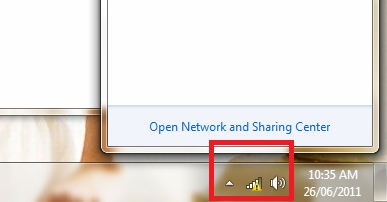
You can see how to fix computers that cannot connect to wifi on Windows 7 in the video below.
How to fix wifi with an exclamation mark error on a laptop
Turn off the firewall on your computer
Sometimes you configure the firewall incorrectly, causing all internet access to be blocked. To fix this, go toControl Panel → System and Security → Windows Firewall. Reset the settings by selecting Restore defaults. If it still doesn't work, try turning off the firewall completely.
If you install antivirus software, you should also try disabling the antivirus's firewall to see if you can access the internet.
Change the Internet Network Address
- Step 1: Open Network and Sharing Center => Change Adapter Settings
- Step 2: Right-click on Local Area Connection
- Step 3: Click Configure
- Step 4: Select the Advanced tab
- Step 5: Check the Network Address box and change the value by entering 12 random digits (e.g., ADB1204HD91A)
- Step 6: Click OK.
Change the Wi-Fi network mode selection
After the laptop finds a new connection, Windows will display a notification for you to choose how the connection network operates. Choose Work or Home Network, not Public. Because the Public mode offers higher security, the firewall blocks many strange connections.
Restart Wireless Zero Configuration
Restart the Wireless Zero Configuration service: Start => Control Panel => Administrative Tools, select Services or simply type services.msc in the Run window. Find the Wireless Zero Configuration line to start it if it hasn't been started.
>>> Easily carry and mobile Wi-Fi hotspot with: 4G Wi-Fi hotspot device
Create a new IP address for the computer
If you still cannot connect, continue with the following method:
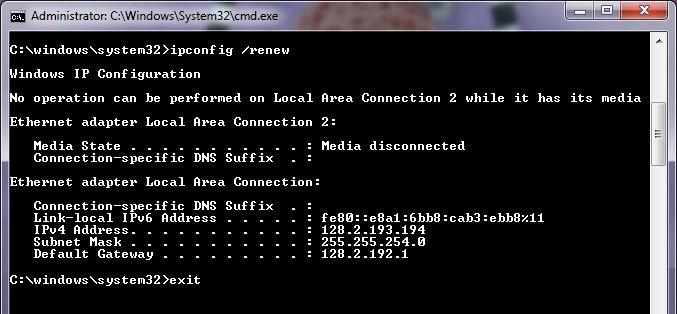
- Step 1: Open CMD, type Ipconfig /flushdns and wait for it to complete
- Step 2: Type ipconfig /release and wait for it to complete
- Step 3: If you still cannot connect to the internet, type Ipconfig renew
With this syntax, your laptop's IP address will be recreated. Please try to connect to see if you can access the network.
Error: WiFi network name not found on laptop
Click on the WiFi network icon you are connected to, right-click on it and select Properties. Check the box for [Connect automaticcally when this network is in range] Another case is that the WiFi network has been hidden. To connect to a hidden WiFi network, click on the network icon in the bottom right corner. Select [Connect even if the network is not broadcasting its name (SSID)].
Figure 2: Select set up a new connection networkThen go to .
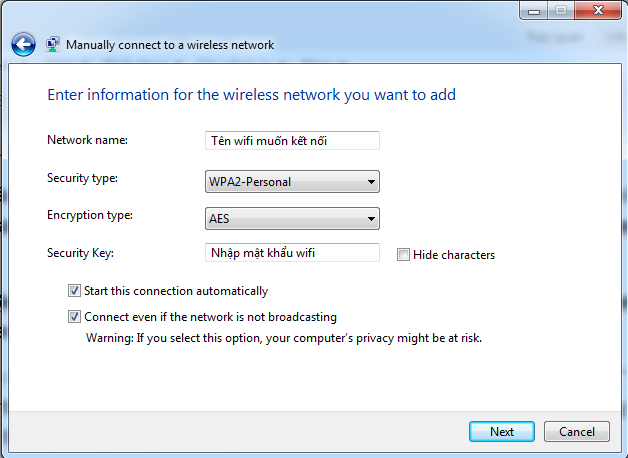
Set up a new connection or network (Add) and then select Manually connect to a wireless network . Then fill in as shown below. Enter the name of the wifi network you want to connect to
- Enter the name of the WiFi network you want to connect to Select WPA2-Personal
- Select WPA2-Personal Bạn chọn WPA2-Personal
- Encryption type:AES or TKIP (If AES cannot be entered)
- Enter the wifi passwordEnter your wifi password
Check the 2 boxes below and then click Next. If the laptop can detect the wifi, it will connect in less than a minute. This is how to connect to a hidden wifi network on a laptop.
Wifi on the laptop only has 1 bar
This is because you placed the wifi emitting device incorrectly, placing it in areas with partitions and far away reduces the performance of the wifi signal. You should restart the wifi emitter or move the device closer to the emitter.
If you are on a different floor, you can buy an additional wifi emitter or a wifi booster to enhance the laptop's ability to receive wifi signals.
Forgot or lost wifi password
You just need to reset the wifi emitting modem. Usually the reset button is small or located in a hole. Hold the reset button for 5 seconds and then release. Then go to the modem settings to reset the password. Usually the default username and password will be admin.

Fixing the Wifi Acquiring Network Address error (There is wifi but cannot access the internet)
Cannot access Wifi due to the above error, even if setting static or dynamic IP or repairing does not work. The fix is as follows:
- Open "Network Connections"
- Right-click the wireless connection icon that has an error and select "Properties"
- Click the "Wireless Networks" tab
- Under the "Preferred networks" section, click on your network and then click "Properties"
- Under the "Association" tab, set Network Authentication to WPA in the dropdown menu, and set Data Encryption to TKIP.
- Reconnect, re-enter the Wifi connection password.
Error with red X on wifi
First, check if you accidentally turned off the wifi. Go to theNetwork and Sharing Center" → Change adapter settings". Please check if the wifi network is turned off. In the image, the gray wifi network is turned off. You just need to turn it on to have wifi immediately.
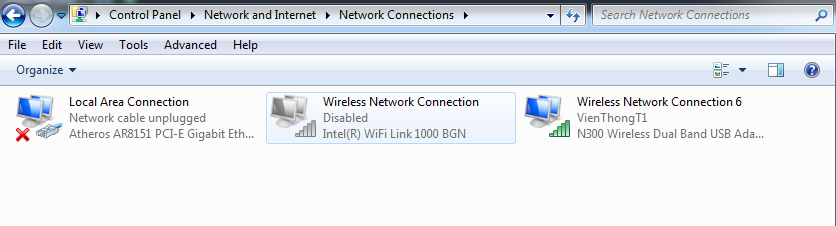
If the wifi is already on but the wifi on the laptop still shows a red X, you should take it to a repair shop for inspection or replace the wifi card. Because this error is 80% due to hardware. I also encountered a similar error on my laptop and bought a wifi card to replace it, and it was fixed. Or you can use a USB wifi receiver to plug in and use.
Here are all the wifi errors on laptops and how to fix them quickly. If your home modem is broken, please refer tobuy a cheap 3G wifi router use it temporarily.
Article edited and updated on 01/13/2020





