


 English
  Tiếng Việt
 With the sharing guide to connect Viettel 4G on iPad will help you easily surf the web at the highest speed in the area where the carrier is testing with the fourth-generation wireless connection technology. Compared to smartphones and Tablets running the Android operating system, connecting Viettel 4G on iPad requires certain requirements, and you should not worry too much. How to enable 4G connection on iPad is also extremely easy with just a few steps. Let's3GWIFI.NET proceed to make using 4G on iPad easier.

Instructions on how to connect Viettel 4G on iPad quickly
Easy guide to connect Viettel 4G on iPad
Before you use 4G to surf the web, listen to music, watch HD movies, or go on Facebook online on your iPad, the SIM card you are using must be a 4G SIM card from Viettel.
>>> Are you looking for: Viettel 4G USB modem
Place to changeViettel 4G SIM: Go to Viettel's customer care centers immediately to switch to a 4G SIM.
Conditions for changing to a 4G SIM: You just need to bring your SIM card and ID card to switch to a 4G SIM and ensure that the area where you live has been covered by 4G network.

The fee for a Nano SIM card to be used on an iPad device is: 25,000 VND/SIM.If the area you are testing has 4G coverage, internet access will be free.If you move out of the 4G coverage area, the SIM will automatically continue to use 3G.
How to connect Viettel 4G on iPad is extremely simple
>>> You should also see: 4G WiFi Router
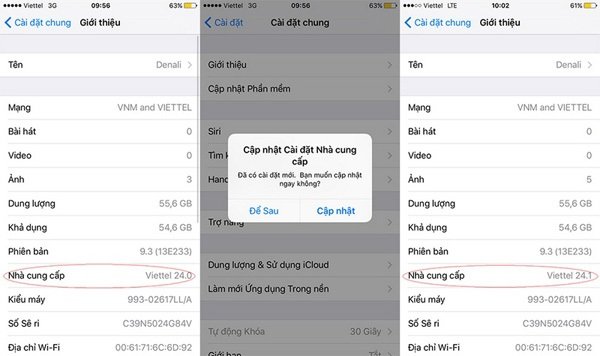
Step 1: The device must be updated to iOS version 9.3 by accessing Settings -> General -> Software Update.

Step 2: Updating the carrier will help you check if the device supports using Viettel 4G. Select Settings => General => About => Carrier. If "24.1" appears, the device supports 4G.
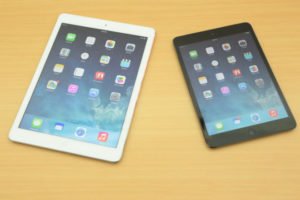
Step 3: Turn on the 4G connection on your iPad and use high-speed internet to easily access the network.

We hope you successfully connect to Viettel 4G for your iPad and have many new and exciting experiences with the new high-speed wireless network service.





