


 English
  Tiếng Việt
 Hiện nay máy tính được sử dụng thường xuyên hơn hầu như ai cũng cần đến 1 chiếc máy tính để làm việc hoặc giải trí hay là lưu trữ dữ liệu quan trọng, chính bởi vậy máy tính cần phải được bảo mật tốt hơn để các dữ liệu quan trọng trong máy tính hoặc thông tin cá nhân không bị lộ ra ngoài. Bởi vậy 3GWIFI.NET sẽ mách bạn how to change Windows 7 computer password Floating market form in Bangkok
Một khi máy tính của bạn đã được đặt mật khẩu chắc chắn bạn sẽ không cần phải lo lắng tới vấn đề các dữ liệu bị mất hay là bị người khác xem trộm hay là ai đó cố tính phá phách các phần mềm máy tính của bạn. Cách cài mật khẩu máy tính win 7 not too difficult but not everyone knows, especially those who are not proficient with computers.

>>> You want to use Wi-Fi for your computer, laptop, see: cheap 4g usb
Các bước hướng dẫn cách đổi mật khẩu máy tính win 7
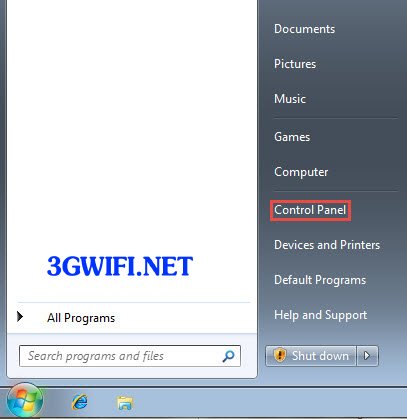
Step 1: On the main screen, select Start, then go to Control Panel.
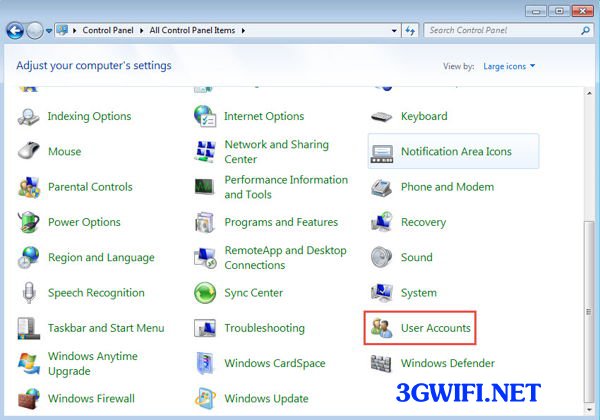
Step 2: Find the User Accounts section
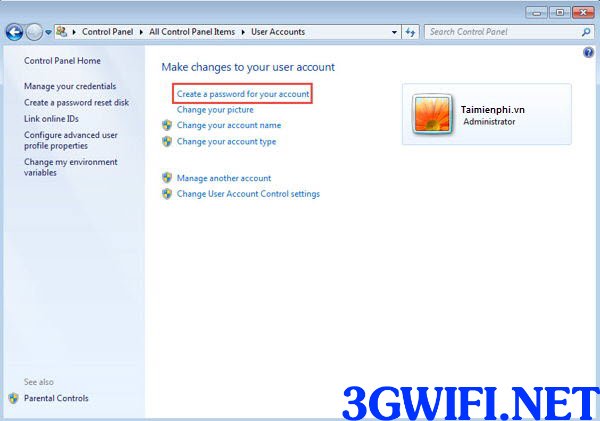
Step 3: Then select Create a password for your account.
Step 4: Enter the password you want to set for Windows 7. The longer the password combined with numbers, the harder it is for others to guess. The box below is called Password hint, which contains characters to remind you of the password in case you forget it.
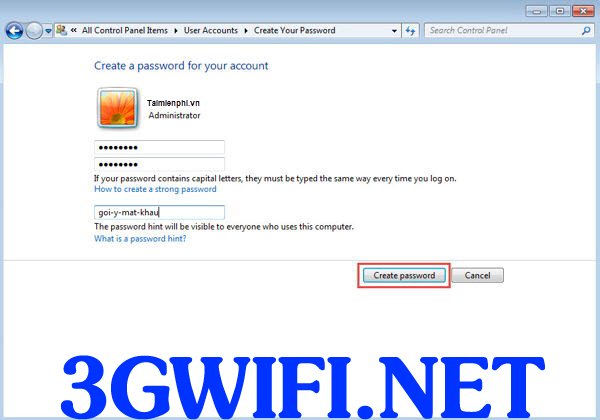
Bước 5: Sau đó bạn nhấn nút Create passwordto complete the password setting process for Windows 7, then try restarting your computer. If the computer screen displays a field to enter the password to access the main screen, it means the password setup was successful.
>>> Share WiFi for Windows 7 laptop using a device: Wireless 3G WiFi router

Thus 3GWIFI.NET has finished guiding you through how to change Windows 7 computer password. If you encounter any questions in the above steps, please leave a message below and 3GWIFI.NET will answer your questions as quickly as possible.





