


 English
  Tiếng Việt
 Currently, there are some laptop lines equipped with a physical key on the computer to quickly turn Wi-Fi on and off, but for computers that do not have that button, you can set up basic shortcuts yourself with the following instructions.turn on off wifi win 10right after this.
 Computer with built-in Wi-Fi toggle button
Step 1: View the name of the Wi-Fi the laptop is connected to
You navigate to Control Panel Network and Internet Network and Sharing Center Change Adapter Settings.
Then, record the name of the Wi-Fi you want to turn on and off.
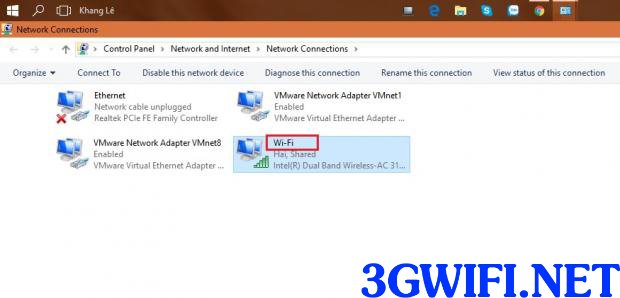
Identify the Wi-Fi connection name you want
>>> Refer to high-quality Wi-Fi hotspot devices at: mobile wifi
Step 2: Create shortcuts on the Desktop
After knowing the name of the Wi-Fi connection, you just need to create a shortcut on the screen by right-clicking on the Desktop and selecting New Shortcut.
Next, copy and paste the command line below into the "Type the Location of the item" box.

After getting the Wi-Fi connection name, you can start creating shortcuts on the Desktop by right-clicking on the Desktop, selecting New Shortcut.
netsh interface set interface name= "Wi-Fi" admin = Disabled.
Replace "wifi" in the command line with the name of the Wi-Fi you want to connect to.
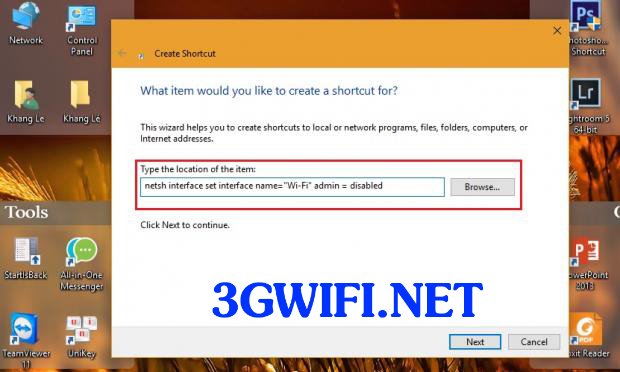 Create a shortcut on the main screen
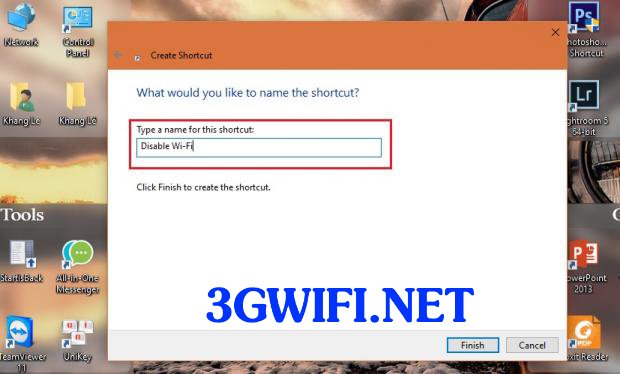 Name the shortcut
Name the shortcut Disable Wi-Fi and click Finish, similar to the above, but you should copy and paste the command below into the "Type the location of the item" box and replace "wifi" with the name of the Wi-Fi you want to connect to.

Next, we will create a shortcut to turn on Wi-Fi, similar to the above. But you copy and paste the command below into the Type the location of the item field, replacing Wi-Fi with the name of your Wi-Fi connection.
Name the shortcut Enable Wi-Fi and click Finish.
Step 3: Allow shortcuts to run with administrator privileges
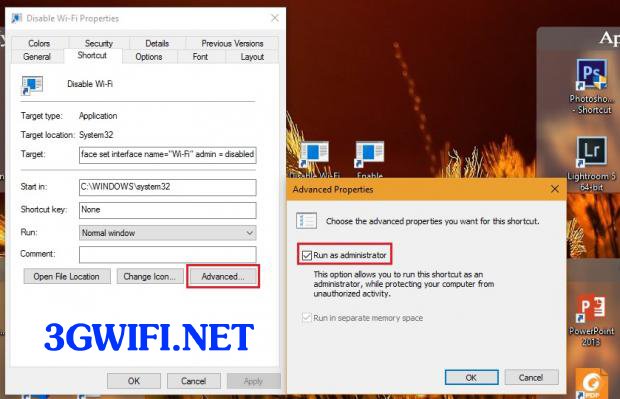 Always allow shortcuts to run with administrator privileges
Next, you grant administrator privileges to these shortcuts by right-clicking on them and selecting Properties → Advanced → Run as Administrator, then click OK.
Step 4: Assign keyboard shortcuts to the shortcuts
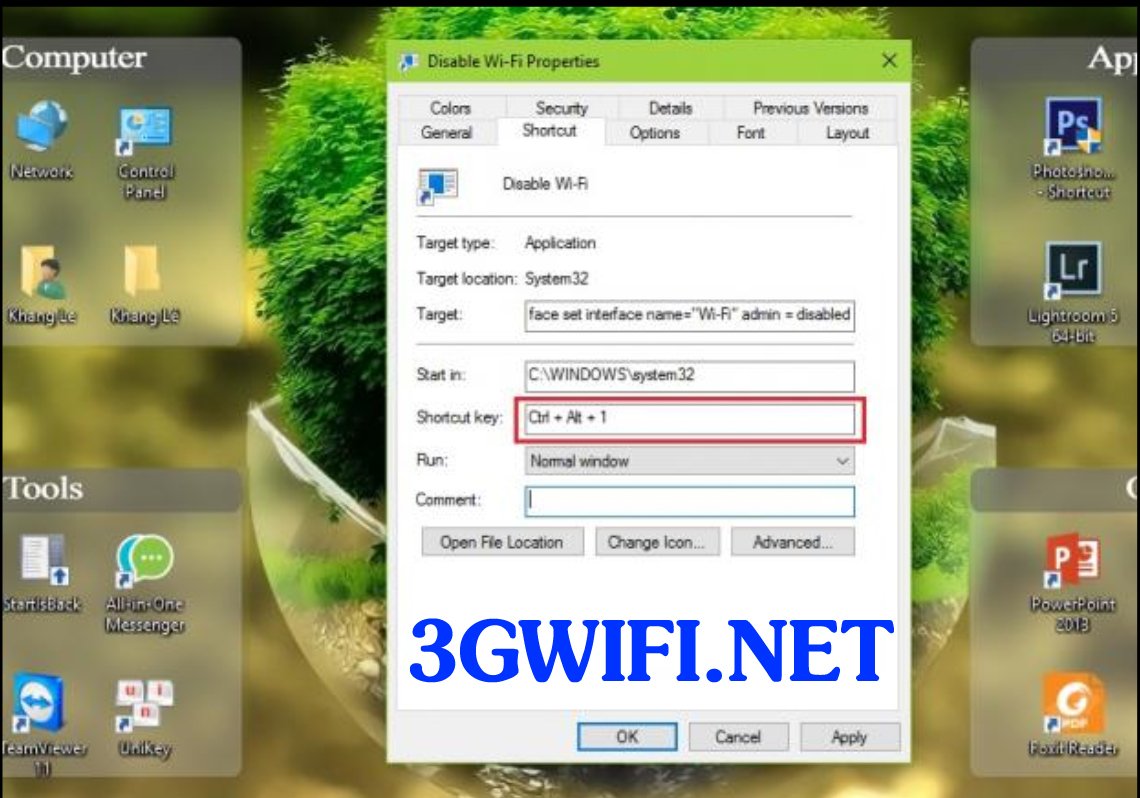 Assign the keyboard shortcut you want to the Shortcut
Finally, you assign a quick keyboard shortcut to quickly turn Wi-Fi on and off by right-clicking on one of the Shortcuts and selecting Properties. There you can select the Shortcut key field to assign the key combination you want.
For example, you choose the key combination Ctrl + Alt + 1, then place the mouse cursor in the Shortcut key field and press the key combination Ctrl + Alt + 1 to test.

>>> USB 4G Wi-Fi hotspot integrated with Windows 10, no installation required: cheap 4g usb
Repeat the same as the step above for the second shortcut for any keyboard shortcut you want. For example, assign Ctrl + Alt + 1 to turn off Wi-Fi and Ctrl + Alt + 2 to turn on Wi-Fi.
By following the steps above, you can turn Wi-Fi on and off simply by pressing the key combinations you have assigned. Good luck with these steps.





