


 English
  Tiếng Việt
 - 1. Turn off automatic app downloads over cellular data
- 2. Turn off cellular data usage for iCloud Drive
- 3. Turn off Wi-Fi Assist mode
- 4. Turn off apps that consume a lot of mobile data
- 5. Turn off background app refresh
- 6. Turn off unnecessary Safari tabs
- 7. Turn off video auto-play on Facebook
- 8. Turn off high-quality music in Apple Music
- 9. Turn off mobile data when not in use
In this article, I will guide you on how to save 4G on iPhone, with these tips, we guarantee you will use more services from your carrier. You should buy now 3G/4G SIM cards to not only save costs but also ensure you can use 3G or 4G data forever without running out.
Turn off automatic app downloads over cellular data
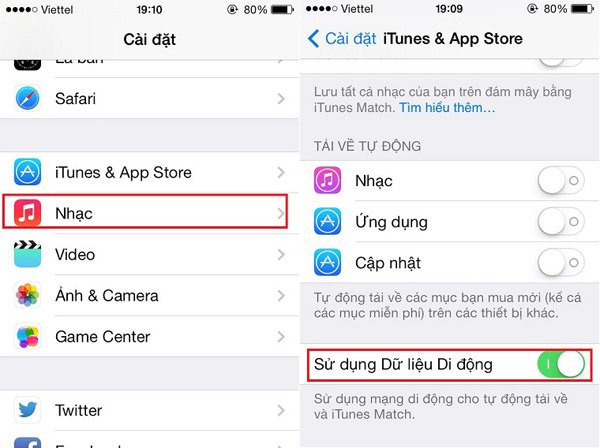
Downloading software for your phone is the main reason users consume a lot of 4G data. If possible, turn off this feature and only download apps when connected to Wi-Fi.
To turn off that feature, go to Settings -> App Stores & iTunes -> Cellular Data -> Off.
Turn off cellular data usage for iCloud Drive
iCloud Drive is a tool that helps users store, sync, and update data across Apple devices or even Windows. Of course, it also needs an internet connection.
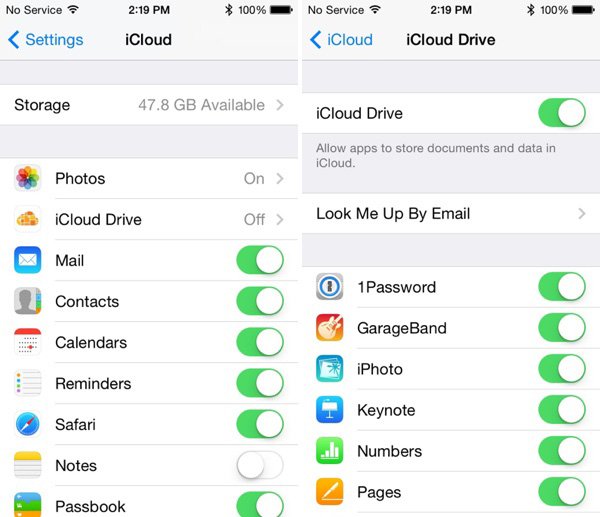
To prevent this feature from using cellular data, you need to go to Settings > iCloud > iCloud Drive, then scroll down to turn off the 'Use Cellular Data' option.
>>> You should refer to more attractive products:Huawei 4G Wi-Fi Router
Turn off Wi-Fi Assist mode
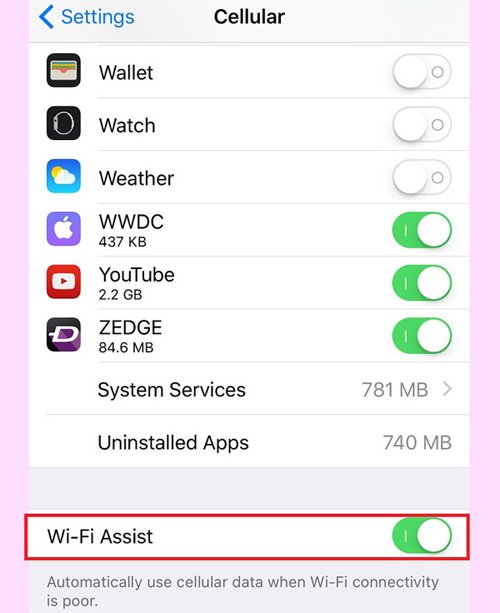
Wi-Fi Assist is a great feature that helps users browse the web better by connecting to cellular data to replace a weak Wi-Fi signal. This will consume a lot of your 3G data if you don't pay attention.
To turn off Wi-Fi Assist, you should do the following: Go to Settings, then select Cellular -> Wi-Fi Assist to turn it off.
Turn off apps that consume a lot of mobile data
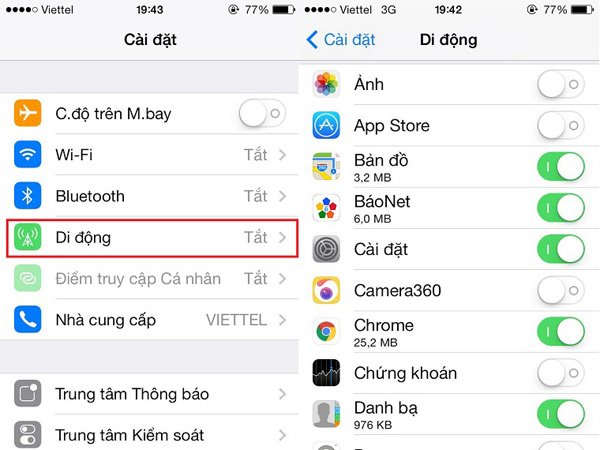
The apps you install on your phone will consume quite a bit of your 3G data, so for apps you don't need, remember to turn them off immediately to maximize your data usage.
The steps to turn off data usage are as follows: Go to Settings -> Mobile -> Mobile data usage -> Turn off unnecessary applications.
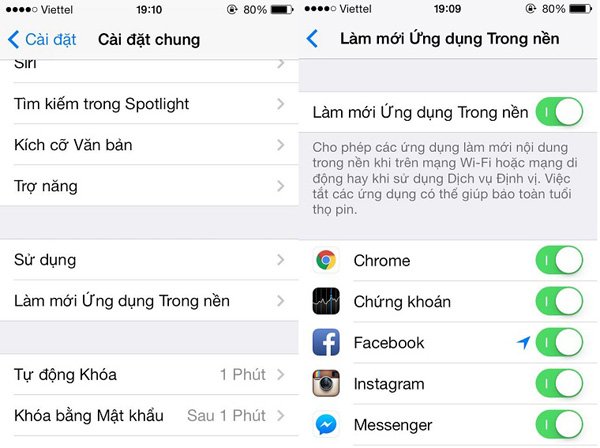
Turn off background app refresh
Some applications automatically start and consume a large amount of your data, so you need to turn off unnecessary applications to avoid incurring 3G charges.
To turn off background app refresh, you need to do the following: Go to Settings -> General -> Background App Refresh -> Turn off applications that you do not need to use.
Turn off unnecessary Safari tabs
Many iPhone users have a habit of opening too many tabs in the Safari browser and forgetting to close them. This consumes 3G data when you browse the internet. Therefore, after visiting a website, you should close those tabs to limit excessive 3G data consumption.

Turn off video auto-play on Facebook
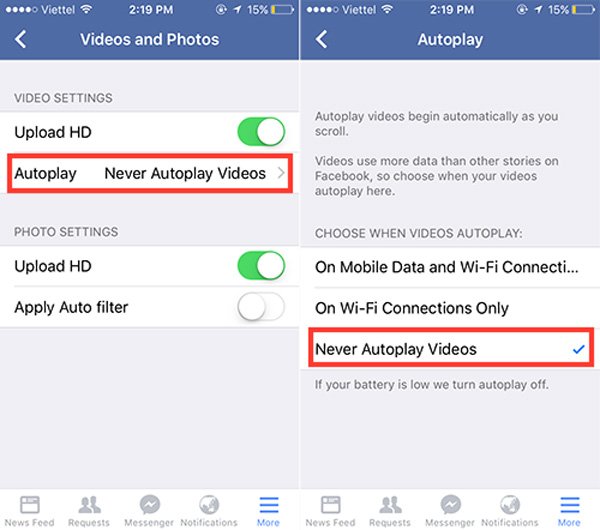
To turn off auto-play videos when you access Facebook, go to the Facebook app > More > Settings > Account Settings > Videos and Photos > Autoplay > select Never Autoplay Videos.
>>>Refer to compact iPhone Wi-Fi hotspot devices:4G mobile Wi-Fi hotspot
Turn off high-quality music in Apple Music
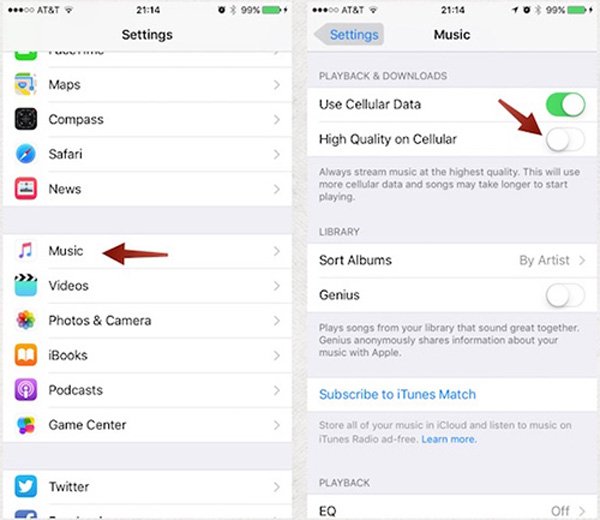
The higher the music quality, the larger the file size and the more 3G/4G data it consumes. Therefore, if you don't need it, you should reduce the music quality by going to Settings > Music > High Quality on Mobile.
Turn off mobile data when not in use
A common habit among iPhone users is forgetting to turn off the network connection when it's not needed. This consumes a significant amount of data because of background apps like Facebook, Zalo, Line, or location services.
Therefore, you need to disconnect the network immediately after you are done using it to ensure optimal data savings.
Remember these tips for using 3G/4G on your iPhone. And don't forget to buy aViettel 4G SIM cardso you can browse the internet to your heart's content.
These are the most effective 4G saving tips for iPhones that everyone is using. You should use them and share them with others.





