


 English
  Tiếng Việt
 Nowadays, every household has internet and uses WiFi. However, many people want to use WiFi without paying. They often try to hack passwords or ask for them, which is very annoying. If you don't give your neighbors the password, they will talk about you. One way to avoid being hacked and bothered by neighbors asking for the password is to hide your WiFi name. Let's see the simplest how to hide WiFi method in this article.
>>> You can see mobile devices with WiFi hiding functions at: 4g sim wifi router
What is WiFi SSID ?
SSID (Service Set Identifier) is your WiFi name, which helps users distinguish between WiFi networks, especially in areas with many wireless networks.
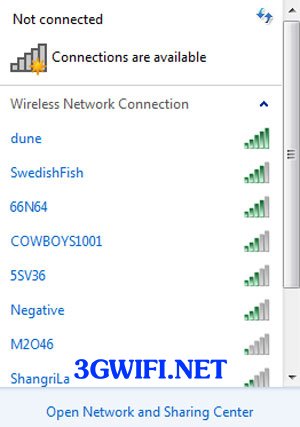
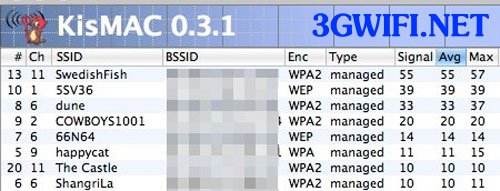
SSID is displayed when users scan for nearby WiFi. However, with modems that have functions like turning off SSID, when you select the SSID off mode, it means that users scanning for WiFi will not be able to find the WiFi network you are using.
Hiding the SSID by selecting the SSID broadcast function will prevent others from knowing that there is WiFi around. But don't let this mislead your security concepts. Someone with special devices can still get your WiFi SSID even if you have selected the SSID off function.
How to hide WiFi name for TP-Link, Huawei, Tenda, Viettel, FPT, VNPT WiFi routers
This setting on all devices is generally called SSID Broadcast. To turn off the SSID broadcast function, you just need to log in to the modem's configuration page by typing the modem's IP address into a web browser. Usually, the default modem IP address is 192.168.0.1 or 192.168.1.1. You can flip the modem over to see the IP address. After entering the IP address, the modem will display a login screen. Enter the username and password. For modems from VNPT, Viettel, FPT, if you don't know the password, you can ask the hotline.
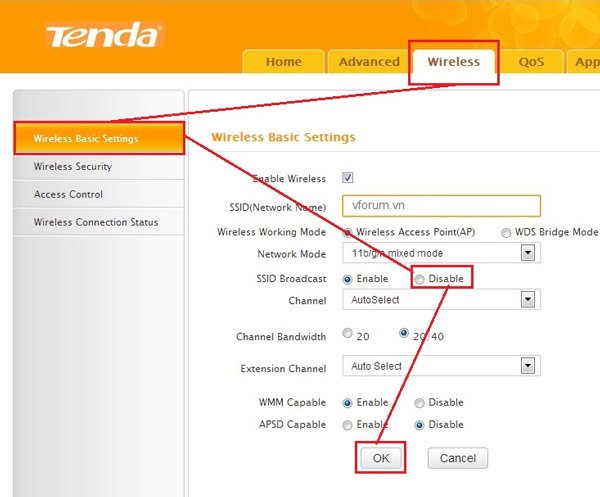
Currently, all WiFi modem models have a common way to hide the WiFi name: go to the Wireless Basic Setting section. Find the Broadcast SSID option and check the Disable box or uncheck the Enable box, then Save.The modem will ask you to reset it before it takes effect.
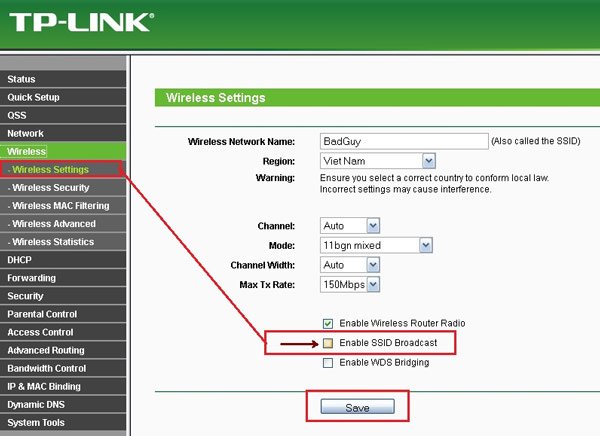
After setting up SSID off, your WiFi will no longer be displayed. However, computers, laptops, and phones that have already saved and connected will still be able to connect.For laptops that have lost connection or need to create a new connection, do the following:
Click on the network or WiFi icon, select Open Network and Sharing Center → Manage Wireless Networks → Select Add to add the hidden WiFi name. For example, 3gwifi.net, then select the security type, usually WPA2-Personal, and enter the password in the Security Key field, then click Next to create.
It is important to check the box for Connect even if the network is not broadcasting... After creation, the computer will automatically connect to wifi.
In case you want to re-enable wifi, just select Enable and save, the opposite of the above settings.

You should remember your wifi name well because if you forget, you cannot connect to wifi. If you forget, you must go to the wifi device configuration page to check again.
And one thing you need to pay attention to is that you should remember your SSID well because that information is very necessary for you to connect to the wireless wifi network later, if you forget, you will not be able to find your wifi and you will need to go to the configuration page to find the information.
Hiding the wifi network SSID is the best way to secure your wifi for those who are not tech-savvy. This also helps you avoid the hassle of neighbors asking for the password.
Video tutorial on how to secure wifi (hide SSID)
https://youtu.be/_fu0wEE7EckYou already know how to secure your home wifi, right? Follow the video to hide your home wifi name. Good luck.





