


 English
  Tiếng Việt
 Your smartphone has many features, including Wi-Fi hotspotting. This is one of the newer and more convenient features of a phone. Many people still don't know how to set up Wi-Fi hotspot from phone. Let's find out how to set up Wi-Fi for each of the latest phone models currently available.
How to create the best Wi-Fi hotspot from your phone
How to Create a Wi-Fi Hotspot from Your Phone
To be able to create a Wi-Fi hotspot from your phone, the first thing is that your phone needs to have a 3G or 4G SIM card installed. The strength of the Wi-Fi signal depends on the phone's network speed. Then, depending on the phone model, you can set up the Wi-Fi hotspot.
Set up for iPhone
To enable your iPhone to broadcast a Wi-Fi signal to other devices, follow these steps:
Go to Settings => Enable Cellular Data => Enable Personal Hotspot => Set Password => OK
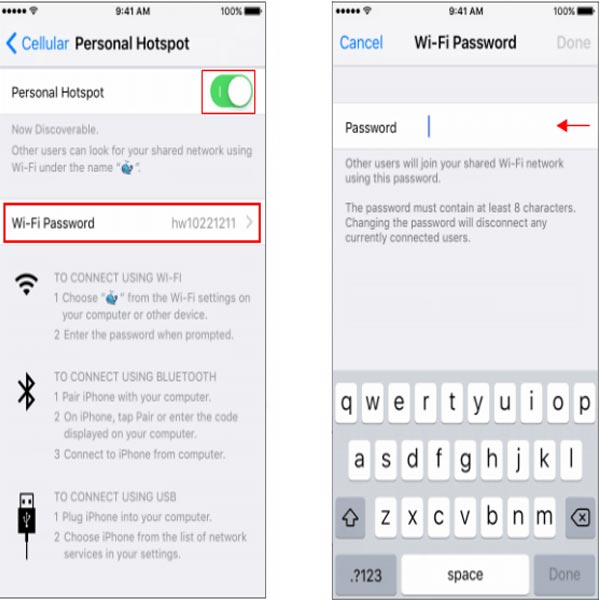
Create Wi-Fi hotspot from iPhone
>>> Use a mobile hotspot device to create Wi-Fi for multiple devices instead of creating Wi-Fi from a mobile phone: 4G Wi-Fi router
After completing the above steps, use the device that needs to access the internet to search for Wi-Fi. You will find the Wi-Fi name as the name you set for your phone. Simply enter the password as you would with a normal Wi-Fi connection, and you can access the internet through your iPhone.
At this point, a small blue area will appear on your iPhone showing the number of connected devices. The more devices connected, the more data you will use. Therefore, you should use subscribed data plans or large-capacity data SIMs to ensure longer access.
Set up for Android phones
Android phones include brands like Samsung and Oppo. To set up a Wi-Fi hotspot for this phone model, follow these steps:
Go to Settings => Enable Mobile Network => Go back to Settings => Select More => Enable Personal Hotspot => Set Name and Password => OK.
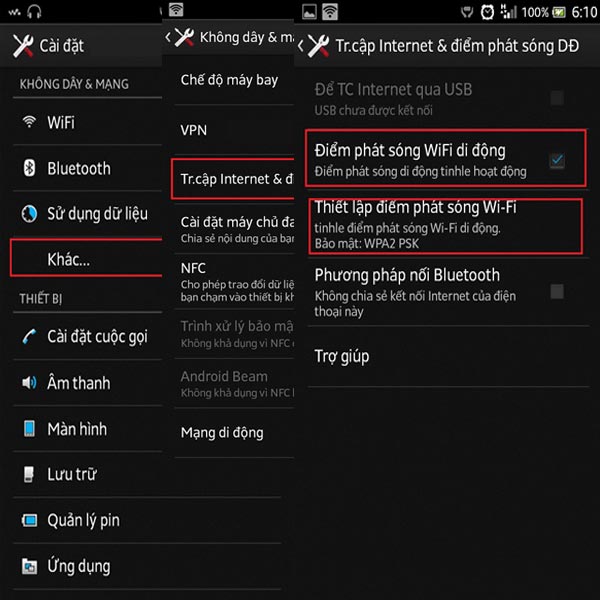
Create Wi-Fi hotspot from Android phone
>>> If you want to use Wi-Fi for an event or meeting with simultaneous internet access, check out: event Wi-Fi
Unlike the iPhone, it is difficult to know the number of access points.
Settings for phones running the Windows operating system
There are still some phones running the Windows operating system. To set up Wi-Fi hotspot for this phone model, follow these steps in order.
Go to Settings => Internet Connection Sharing => Turn on sharing => Set name and password => OK.
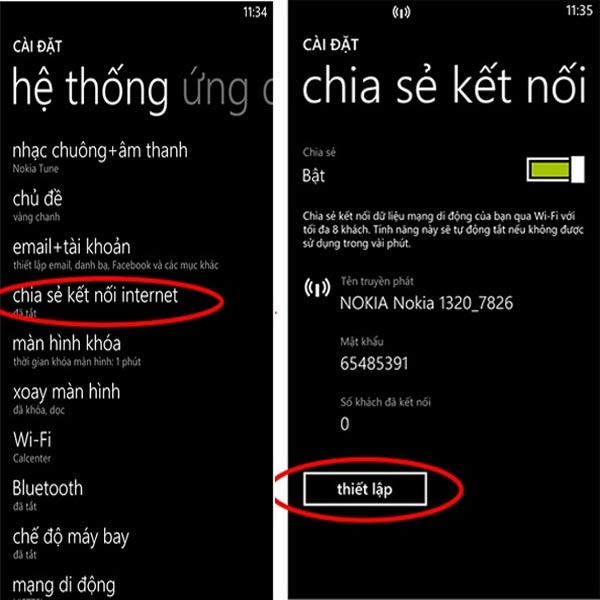
How to set up Wi-Fi for Windows phones
Conclusion
So, setting up a Wi-Fi hotspot for your phone is very simple. Depending on the type of phone you are using, you can follow the steps above. Basically, it all revolves around enabling mobile data and personal hotspot. One thing to note is that the more devices connected when broadcasting Wi-Fi, the slower the network speed will be. Moreover, broadcasting Wi-Fi will consume a lot of money and battery.





