


 English
  Tiếng Việt
 In this article, Sahaha will guide you measure wifi speed the most standard way without having to install any software on your device. We will reveal to you how tocheck wifi speedthe most accurately that anyone can do.
The most accurate and simplest way to measure wifi network speed
That is to visit the speedtest.netpage of Ookla to check wifi network speed. This network testing website is completely free and gives very accurate results. This page can check wifi speed on mobile phones, computers, laptops, and tablets.
Besideschecking wifi network speed, speedtest also helps you check the speed of your Internet connection or 3G/4G. You will see that FPT, Viettel, VNPT network installation technicians all use this page to check Internet speed.
Step 1: Connect your device to the wifi you want to check the speed of. Then go to speedtest.net. The website interface will be as shown in the image below. The wifi testing page has a very simple and easy-to-use interface. Because it is a free page, you will see quite a lot of ads.
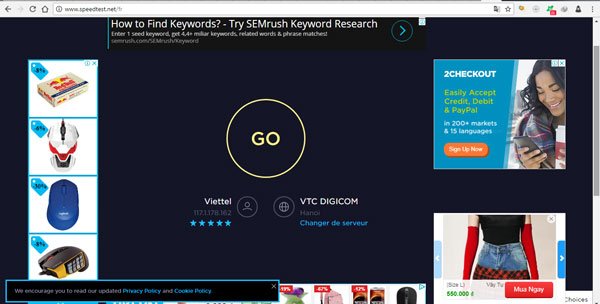 Internet speed test website
>>> If you want to use unlimited high-speed wifi, please: Rent a wifi hotspot
Step 2: Press the Go button and let the website test the wifi speed of the device you are connected to. It's very simple, you don't need to do anything else. If you want to test with multiple locations, please select the Change Server line.
A new page will appear allowing you to select servers to test your wifi network speed. Here I choose VTC Digicom. After selecting, click the X to close.
 Network speed test servers
Step 3: View wifi connection speed test results. After less than 1 minute, you will have results to view. You should test at least 2-3 times for the most accurate results. I will explain the meaning of the results that speedtest provides.
- Ping: simply put, it is the time to connect two IP addresses. The nature of the internet is the connection of IP addresses globally. Ping time is measured in milliseconds (ms). Usually, ping below 30 ms is good.
- Download: is the speed of downloading files and data on your wifi network. The unit of measurement is Mbps. Download speed must be at least 10 Mbps to be standard.
- Upload: is the speed of uploading your files to the network. Upload speed is always lower than download speed. The unit of measurement is also Mbps.
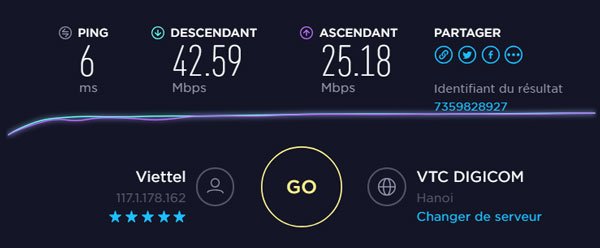 Viettel fiber optic network speed
Notes for the most accurate wifi test
- You must not download or upload any files during the wifi test. This will affect the wifi test results.
- You should choose to test with locations in Vietnam. Because the speed advertised by the network provider is domestic speed. If you test foreign servers, the results will vary greatly.
- You should test 2-3 times to get the most accurate average result.
- Wifi changes constantly, so if the results differ, you shouldn't worry.
- Whether you measure wifi speed on iPhone, Android, laptop, desktop... the results will be similar. You don't need to worry about differences between test devices.
- Wifi changes constantly with distance. Therefore, when testing, you should keep the device in one place.
How to measure the most accurate wifi network speed today
What to do if wifi speed is too slow
If you see wifi speed is too slow compared to what the network provider announced, you should call the hotline to inquire. They may guide you to reset the modem or send a technician to check. If the wifi speed is still correct according to the network contract but you still find it slow, it is very likely that a shark has bitten the cable again.
If you are buying a wifi hotspot device, go to the seller to inquire. However, with a 3G/4G SIM wifi hotspot device, the speed will never be stable. You should test multiple times to get the most accurate results.
Another thing is that the more people you share wifi with, the higher the risk of slow internet. Because many people use one wifi network at the same time, the speed will definitely decrease.
Many people using the same network service in an area will also be affected. Because on the same line, many devices will have to be connected, affecting the wifi speed. You can often see that at night when fewer people are using it, the wifi speed is faster than during the day.
Good luck testing wifi speed. Hope this article has helped you know how to check wifi speed accurately and simply.





