English
  Tiếng Việt
 Change Facebook password on phone with just a few easy steps, in this article 3GWIFI.NET will guide you on the fastest way to change your Facebook password on phones running Android, iOS, and Windows Phone operating systems, ensuring speed and saving you a lot of time if you don't know how.
The Facebook social network is currently used by the most people daily, no other social network can compare. Because so many people use it, there are also many risks regarding personal information security, and the simplest way to protect yourself is to change your Facebook password regularly.

>>> Use a WiFi hotspot device to access Facebook on your phone anytime, anywhere with the product: portable wifi hotspot
Steps to change Facebook on phone
Step 1: Access the Facebook app on Android, iOS, Windows Phone. Tap on the icon with 3 horizontal lines like the image below to enter the account settings section.

Step 2: Scroll down and then select the account settings section.

Step 3: In account settings, select general.
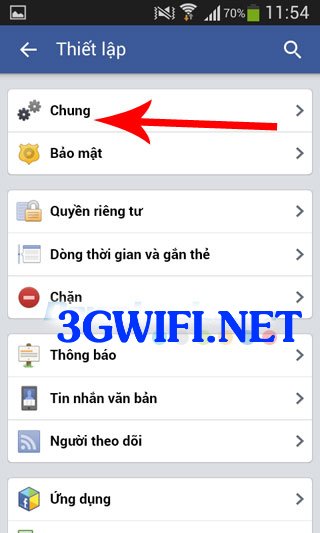
Step 4: Next, go to the password section.
>>> Are you looking for a WiFi hotspot device to browse Facebook: 4g wifi router
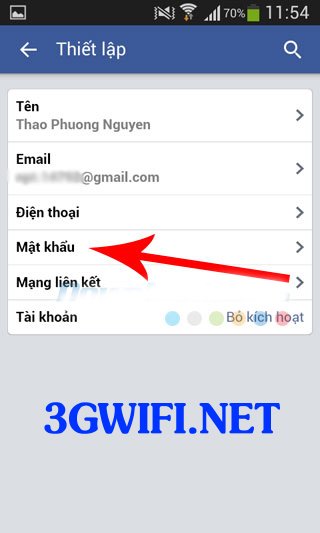
Step 5: In this section, there are 3 fields that require users to fill in complete information. The first field is to enter your old password, the next field is the new replacement password, and the last field is to re-enter the new password you want to change. Then press the change password button.
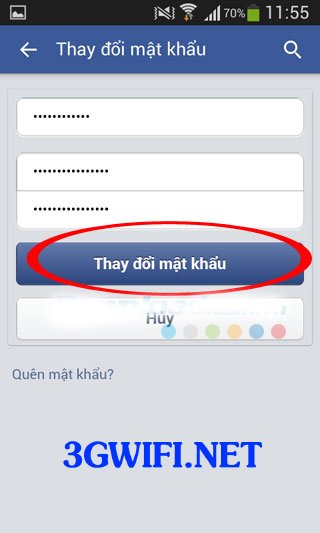
After completing the password change process, Facebook will automatically notify you that you have successfully changed your password and will ask you to log in again with the new password. Above is the way tochange Facebook password on phonesimply and fastest, wish you success.