


 English
  Tiếng Việt
 - 1. Instructions to change wifi password, change wifi pass on mobile phone
- 1.1. Step 1: Prepare a smartphone
- 1.2. Step 2: Connect and log in to wifi on your phone
- 1.3. Step 3: Log in to the wifi modem on your mobile phone
- 1.4. Step 4: Guide to changing wifi password on mobile phone
- 1.5. Proceed to change wifi password on phone
People are often accustomed to changing TP-Link, Huawei, Tenda wifi passwords on their computers. However, this is only a solution for wifi routers used directly on the computer. So how can you change wifi password via phone on those wifi routers without turning on your computer? The solution for you is to change the password directly on your phone. After following the instructions below, hopefully, you will be able to change your wifi password as easily as possible.
Instructions to change wifi password, change wifi pass on mobile phone
Step 1: Prepare a smartphone
To change the wifi password, you need a smartphone to proceed with the wifi password changing steps. As long as your phone is connected to wifi, you can do it.
>>> You might be interested in: 4G Wifi Router
Step 2: Connect and log in to wifi on your phone
Connect to wifi using your mobile phone, you must be able to connect and access the internet.
To connect to the wifi router, access the following address 192.168.1.1 depending on the specific wifi router, the login method may vary, but most access it using the above address. If you want to change the password for a specific wifi router, you can leave a comment below and we will guide you on how to access the wifi modem with the appropriate addresses.
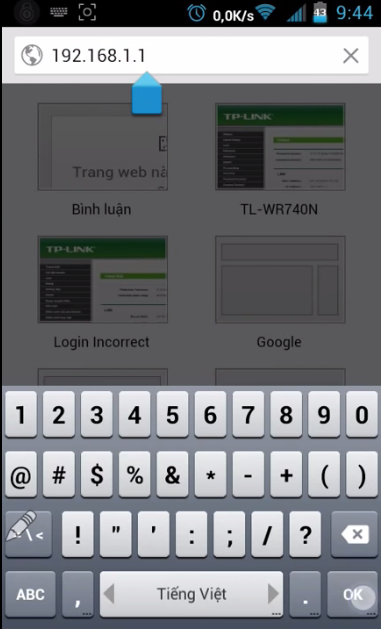 Access the wifi modem on your phone
Step 3: Log in to the wifi modem on your mobile phone
After accessing the modem's address, the system will ask you to log in using the following username and password.
- Username: admin
- Password: admin
If you cannot log in with this username, please contact your network installer to obtain the password.
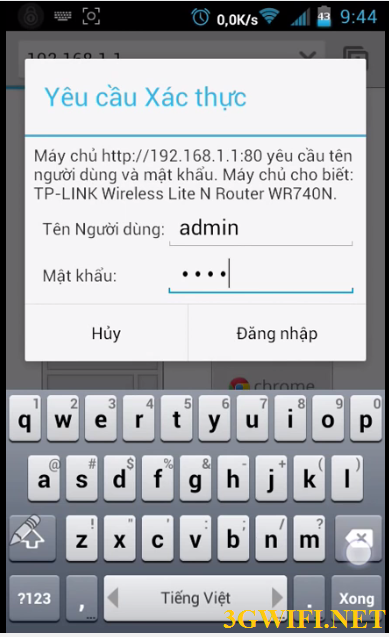 Change wifi password on phone
Step 4: Guide to changing wifi password on mobile phone
Next, you accessWireless > Wireless Security as shown in the image below.The interface will vary depending on the modem. It will mainly be in theSecurity.
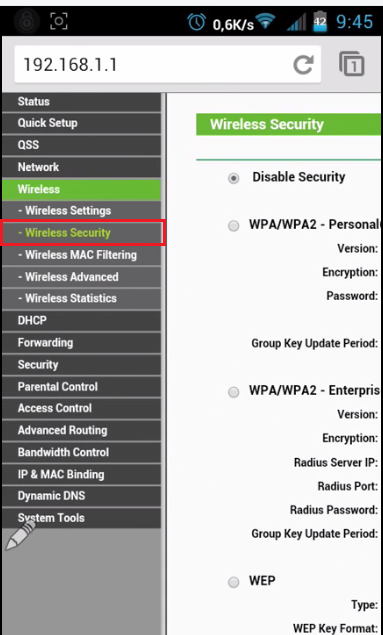 area.
area.
Proceed to change wifi password on phone
Step 5: Change wifi password
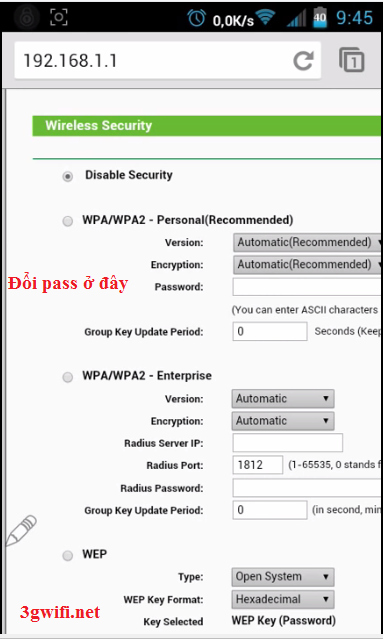 Find the password and user sections. They are usually located close to each other. Proceed to change the password as shown in the image below.
Change wifi password
The process of changing the wifi password has been successful. If you do not understand clearly, you can watch the tutorial video below.
Video tutorial on changing wifi password on mobile phone





