


 English
  Tiếng Việt
 Using data and roaming packages or long-distance calls when you are away or traveling can be very expensive. And here are a few simple ways for you totravel and save 3G dataand turn you into a smart phone user.

Ways to save 3G when traveling
Use an unlocked phone with a local SIM
Before you leave home, you need to make sure your smartphone is unlocked so you can use a local SIM where you are going. Because the cost of roaming data and calls locally, as well as long-distance calls, will quickly drain your money.

Once your phone is unlocked, you can use it with any carrier in the world. In many countries, prepaid SIMs are quite cheap, so you should choose a SIM from a local carrier, and most airports when you first travel or arrive in a new country.
>>>Refer to multi-network WiFi hotspots at: 4g sim wifi hotspot
Download offline maps
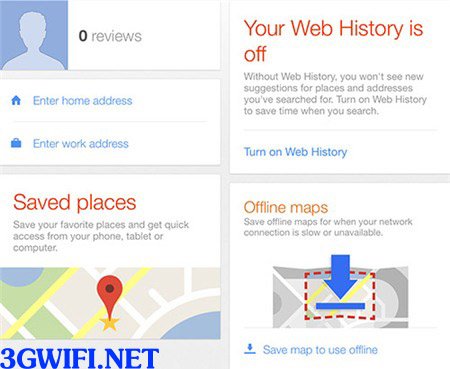
If you frequently use Google Maps and want to find map applications for the places you want to visit, otherwise, every time you zoom in on the map to search in a location, you will consume your data packages.

To download maps, you just need to connect to WiFi, then open the app to the city or region you want to download, then type OK map into the search bar, then download, and that map will be downloaded to your smartphone when you are offline. The phone will then show you your location when connected to the Internet.
>>>Save more 3G/4G data when using WiFi from: Huawei 4g wifi router
This feature helps you save more on data charges and also makes applications load faster and easier to use. Refer to the article and instructions on how to use Google Maps Offline on iOS and Android phones.
Preload travel apps
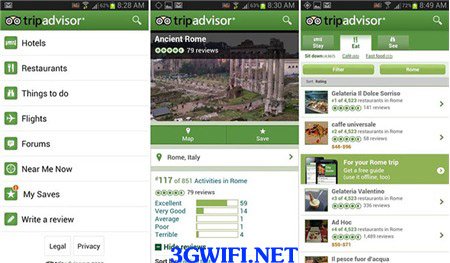
This will help you save more data. That is, before you go, you need to find out more information about the upcoming location reviews, restaurants... You should use an app that functions well even when offline, which will help users access and reviews of photos or maps and help make better choices.

Connect to free Wi-Fi

If you want to save 3G data, then connecting to free wifi anywhere, you just need to download the Wefi app on both iOS and Android. This app includes a list of over 100 million wifi hotspots worldwide, and you can easily see them on the app's map.
Find free Wi-Fi connection codes
There is another way for you, which is to find wifi connection codes, sometimes at cafes at airports or shopping areas to give you free codes every time you make a purchase.

If you don't want to spend a lot of money on the Internet or search Google with the syntax: “Hotspot name + Coupon code”. Sometimes you will find some free coupons for 15 minutes.
Join the password-sharing community

There are some very interesting apps that help users share Wi-Fi passwords or hotspots around the world. The Instabridge app is a great app for sharing passwords because it has a database of about 3 million hotspots, and you can find passwords with a database of 3 million hotspots worldwide, and you can also find passwords even when you are offline.
Use Google Hangouts to call

Long-distance calls can be expensive, or using Skype, although cheaper, is not free. Therefore, Google Hangouts is the best app for you. This app helps you make free calls within the US and Canada. The simplest way is to connect to wifi and call relatives using these apps without having to pay any other fees.





