English
  Tiếng Việt
 Mobifone network operator has distributed quality dcom products, selling very well. However, some of you haven't experienced it yet. Install Mobifone 3G USB for laptop is similar to installing 3G USB of other network providers with the following simple steps.
Instructions for installing Mobifone 3G USB for laptop
First, you need a computer, laptop, 3G dcom, and a Mobifone data SIM with available data. Then, follow these steps:
Step 1: Remove the 3G Dcom cover, then insert the Mobifone 3G SIM correctly as shown in the image. Pay attention to inserting it in the right direction; if inserted incorrectly, it won't receive the signal.
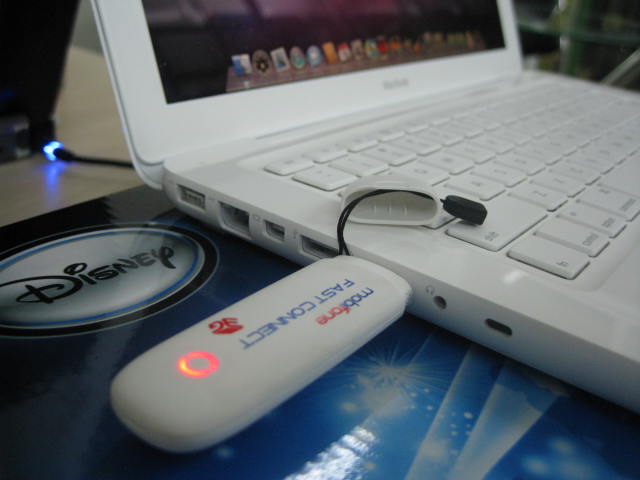
Step 2: Plug the Mobifone 3G Dcom into the computer's USB port. If the USB is not recognized, check if the USB has been installed on the computer.
Step 3: Wait for about 30 seconds for the computer to recognize the 3G Dcom, then select Autorun.exe to automatically install the Mobifone 3G dcom driver.
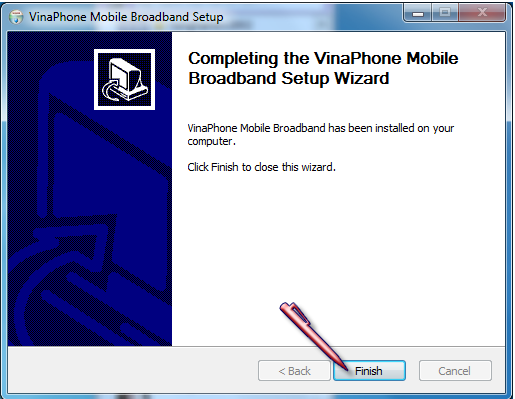
Step 4: Select Next to install. Click a few times, and finally, click Finish to complete.
Step 5:Your computer displays the connection interface of Genuine cheap Mobifone 3G USB. Now you just need to click the "enter your password and click ok to connect." button to connect to the internet (Note: if clicking connect does not show the signal bar, it is because the computer has not fully recognized the driver or the antivirus software has not been turned off).
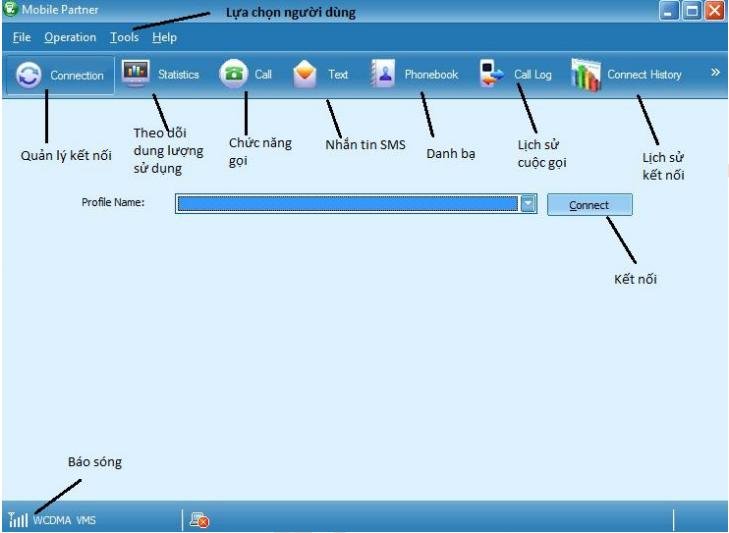
If the connection interface does not appear, you need to reset your computer so it can fully recognize the Mobifone 3G DCOM driver. When it boots up, the connection interface will appear, and you can connect as usual.These are all the steps to install Mobifone USB 3G. We hope you succeed. This installation only needs to be done once; you won't need to install it again later.
If you install it on another computer or laptop later, you will follow the same steps as above. The quick installation only takes a few minutes.