


 English
  Tiếng Việt
 Top up via Website naptien.mobifone.com.vn – đây là most common way to top up Mobifone Dcom 3G today because it is simple and easy to use, helping Mobifone subscribers check their account and top up online.
Hướng dẫn nạp tiền Dcom 3G Mobifone không cần tháo sim
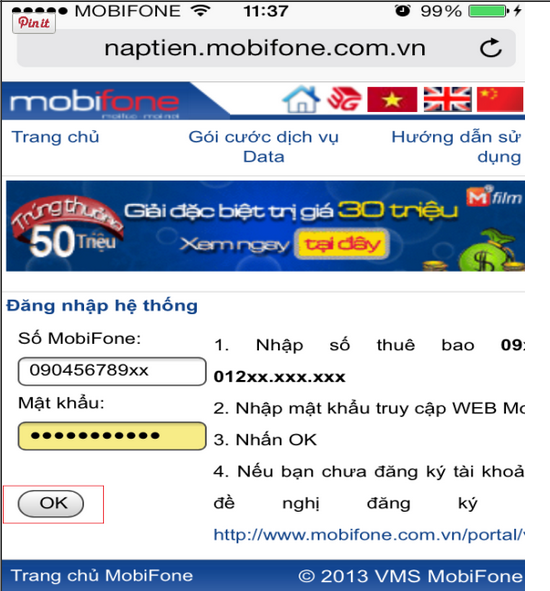
Step 1: You access the website: naptien.mobifone.com.vn (Website specialized for topping up Mobifone 3G SIMs). Remember your SIM number to log in.
Step 2: Register an account and log in. The screen will now display as follows:
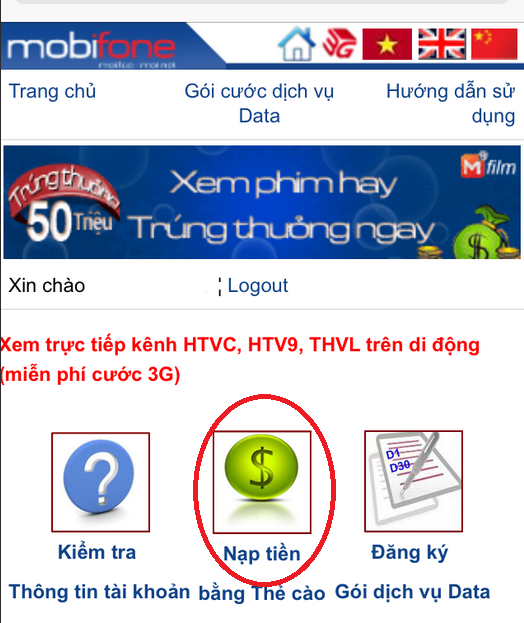
The Mobifone top-up page interface will be as shown below. Click on the Top-up interface. Then select to top up using a phone scratch card.
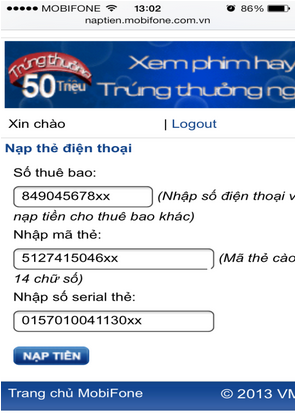
Step 3: Enter the scratch card code, serial number, and the Dcom SIM number to top up. Then click Top up and you're done. The Vietnamese interface makes it very easy to understand.
Hướng dẫn kiểm tra tài khoản Sim 3G Mobifone
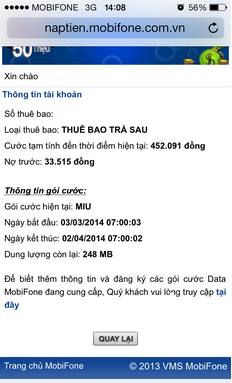
Sau khi nạp tiền xong bạn quay lại bước trên và chọn “Kiểm tra thông tin tài khoản”. Thông tin tài khoản của bạn sẽ được hiển thị ra màn hình gồm tài khoản chính và tài khoản khuyến mãi. Bạn còn có thể kiểm tra xem tài khoản bao giờ cần phải nạp tiền tiếp.
If you are concerned about having to top up monthly, see Mobifone 3G SIM with 1-year unlimited package. You can freely use 3G without having to top up, no worries about the package being canceled.
Here are the simple steps to check your account and top up your Mobifone 3G USB. You no longer need to remove the SIM to top up, saving you trouble. If you need support, please leave a comment below. Wish you successful top-up for your Mobifone 3G DCOM.





