English
  Tiếng Việt
 There are at least 3 ways to top up 3G SIM for iPad that users may not know about. Here, Viettel multi-network 3G modem specialized for tablets would like to introduce to users the 3 simplest ways to top up 3G SIM for iPad without removing the 3G SIM.
If it's a phone, normally when topping up Viettel card we press *100*card code#, but with an iPad, it's not a normal phone, so you certainly won't succeed. Instead, when inserting a SIM, such as Viettel 3G Sim, users must follow the 3 methods below.
How to Top Up 3G SIM for iPad Without Removing 3G SIM
How to top up Viettel card into 3G SIM for iPad in the setting section
Step 1: Go to Settings → Cellular Data → Sim Applications.
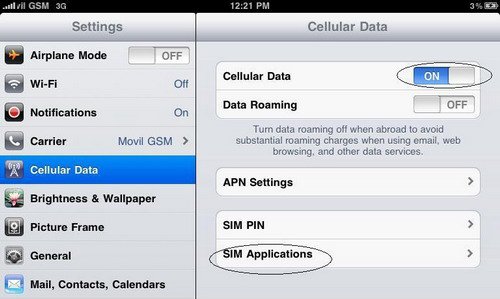
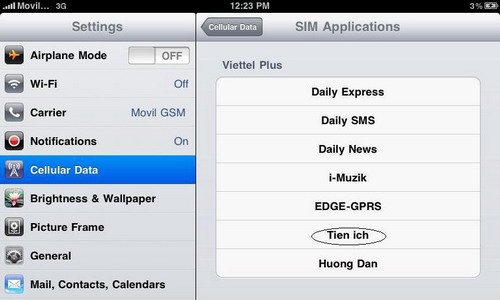
Step 2: You are in the SIM Applications section, then you choose the utility
Step 3: In the utility section, you will choose Top up account.
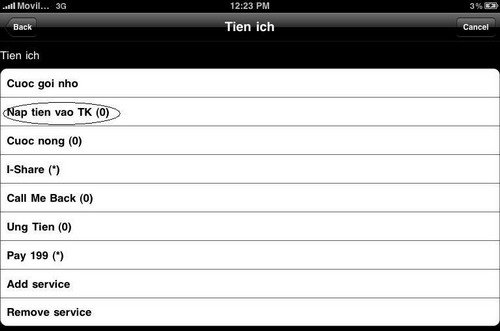
Step 4: Enter the card number then press SEND.

Recharge Viettel card for 3G Sim on iPad using the QueryUSSD app
This method is completely new and many people probably don't know it yet, it is suitable for those who like to explore new things. This is a Cydia app called QueryUSSD that allows us to check account balance and top up very easily. To have Cydia, your iPad must be jailbroken first.
Step 1:
After installing QueryUSSD on Cydia, you will proceed to add the QueryUSSD section by going to Settings. In the QueryUSSD section, there are 3 functions: 1 - check account balance, 2 - where to enter the top-up code, 3 - customize command activation method.
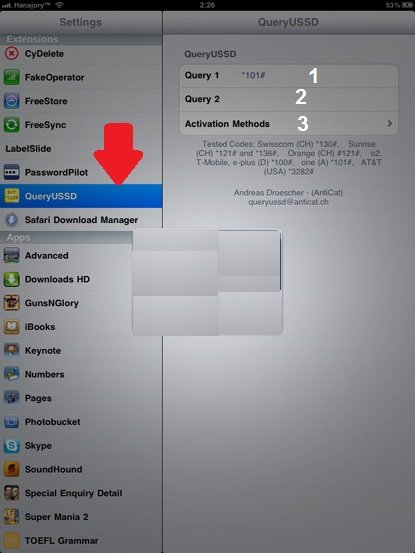
- Collection of3G WiFi hotspotslatest this year
Step 2:
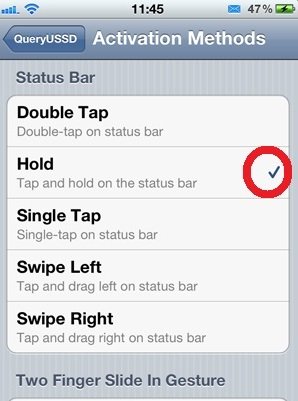
After you enter the Viettel top-up code (*100*CardCode#), select Activation Methods to choose a quick activation method => select Hold and press and hold the Status Bar for 3 seconds.
Recharge Viettel card for 3G Sim on iPad via website
- Viettel 3G Simcustomers access the website: naptien.viettel.vn
- Vinaphone 3G Simaccess the website: naptien.vinaphone.com.vn or 10.1.10.69 to check data usage or top up
- Mobifone 3G Simaccess the website: naptien.mobifone.com.vn
When customers access the above websites, two options will appear: check fees and top up. Customers should click on the action they want to perform. It will display what the customer requested.
Here are 3 ways to top up your3G SIM for iPad that you should know without having to remove the 3G SIM. Please share with your friends.
You might be interested in
- Collection of3G Dcom latest genuine multi-network
Share how to top up the 3G SIM in your iPad without removing the SIM