English
  Tiếng Việt
 Mục lục
Configuration setup APN of always with you wherever you are Mobifone , Viettel, Vinaphone is very simple, just read this article and you will surely be able to do it.
APN configuration of Dcom 3G Mobifone, Viettel, Vinaphone
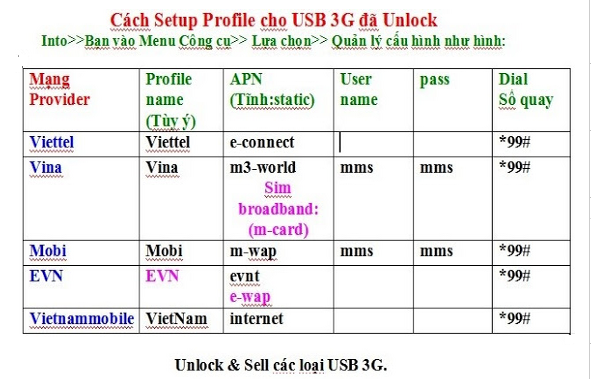
APN configuration of Dcom 3G Mobifone Fast Connect
How to set up APN for Dcom 3G most accurately
With Dcom 3G Mobifone
- APN: m-wap (if it is a dedicated Viettel 3G sim) or mobi (It is a call sim activated for 3g)
- Username: mms
- Password: mms
- Dial number: *99# (mandatory dial number)
With Dcom 3G Viettel
- APN: v-internet (it can be E-Connect if it is a dedicated 3G sim or V-internet if it is a mobile sim activated for 3g)
- Username: leave blank
- Password: leave blank
- Dial number: *99#
With Vinaphone Dcom 3G
- APN: m3-world
- Username:
- Password: MCC
- Dial number: *99#
You just need to fill in the correct APN as the sample above into your device. This is a manual setup method, you can buy more modern devices for automatic APN setup.