


 English
  Tiếng Việt
 You have an old iPhone you want to use a 4G SIM with to create a Wi-Fi hotspot. Check out this article, we will guide you through the simplest way to create a Wi-Fi hotspot from your iPhone.
It is recommended to use iPhone 5S or newer for a stable and best Wi-Fi hotspot. For the 4G SIM to use for hotspot, you can choose one of three network providers: Viettel, Vinaphone, or Mobifone. Depending on your area, avoid using Vietnamobile as its signal is very weak.
How to create a Wi-Fi hotspot from an iPhone
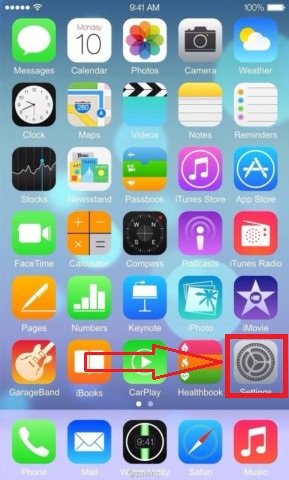
Step 1: First, go to Settings to configure the iPhone's Wi-Fi hotspot feature.
>>> If you want a more stable Wi-Fi hotspot device, check out: cheap 4G wifi hotspot devices
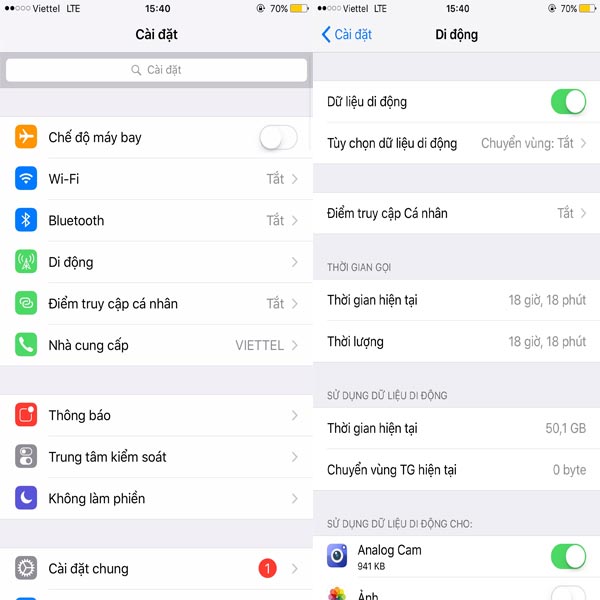
Step 2: Select Cellular, which has a blue signal tower icon as shown below.
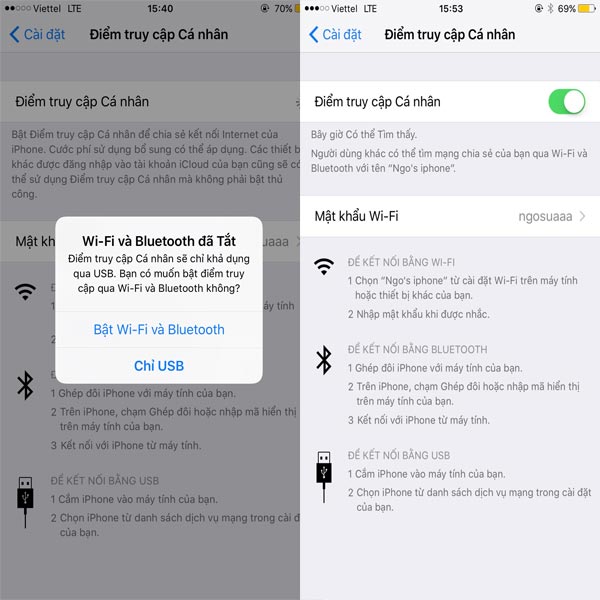
Step 3: Next, select Personal Hotspot to configure the iPhone's Hotspot feature. Turn it on and select Turn on Wi-Fi and Bluetooth. You can customize the password and the name of the Wi-Fi your iPhone broadcasts.
>>> If you are using a computer or laptop, you can refer to: 4G USB Wi-Fi USB dongle to create wifi
Here's how to set up a Wi-Fi hotspot on your iPhone. Newer iOS versions from Apple may have different interfaces. However, the basic steps are to simply turn on cellular data, Wi-Fi, Bluetooth, and Personal Hotspot. As long as you master these operations, you can set up a Wi-Fi hotspot for your phone on any interface.
Video tutorial on how to speed up Wi-Fi on iPhone
Article edited and updated on 05/15/2018.





