


 English
  Tiếng Việt
 Wifi is almost an indispensable thing in the lives of most internet users. So have you ever wondered why you spent a lot of money to install a wifi router but only received poor wifi quality? Surely you will wonder and think that the network provider is throttling your bandwidth. As a major telecommunications network provider, they wouldn't do that, so check your modem, router wifi for any issues. And here are the ways you can optimize and increase your wifi speed.
1: Check the wifi installation location
It's possible you placed it in the wrong location, causing the wifi signal to be weak. Check again if it's in the right place? Usually, wifi routers only have a range of about 50m, and the further you go, the weaker the wifi signal becomes.
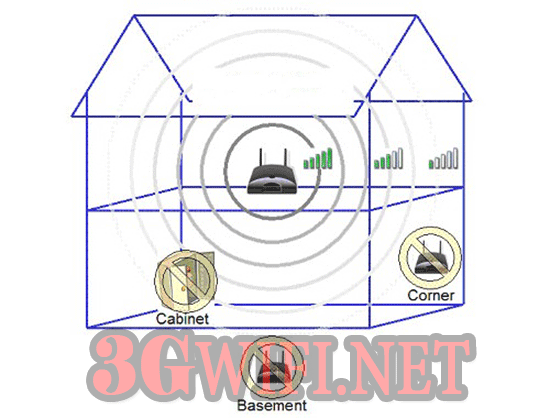 Wifi installation location
- Wifi should be placed in the center of the house so that the wifi signal can be broadcast most comprehensively.
- Place it away from peripheral devices such as microwaves, televisions, radios, as these signals will interfere with the wifi signal.
- Place it in the most airy place, avoid placing it in a closed room with soundproof materials like walls, cabinets, etc.
- The wifi router should not be placed on the ground but on a stand and the antenna should always point upwards.
2: Check access address
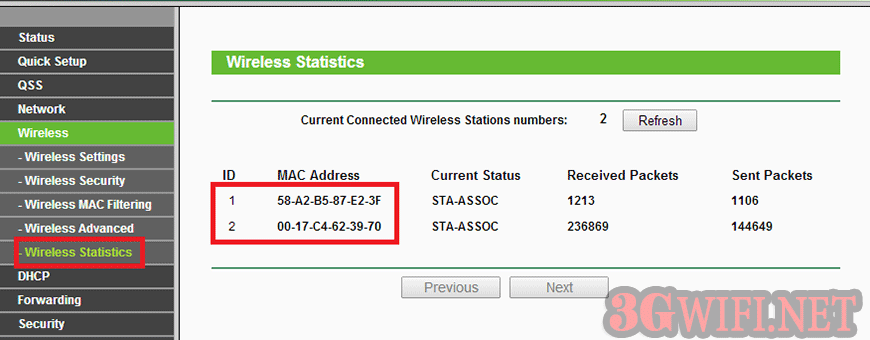 Block MAC address
Check if someone is stealing your wifi and limit it by blocking their MAC address and changing the wifi password. Set a more secure wifi password by adding characters like uppercase letters, lowercase letters, numbers, so your wifi will be much more secure. Avoid your wifi being hacked.
3: Replace and upgrade modem, wifi router
Regularly upgrade the firmware of the wifi router to improve its security and stability. Changing the wifi settings to the standard Wifi 802.11g will greatly increase compatibility with all devices. If you don't know how to set it up, you can ask your network provider to set it up and upgrade it for you.
4: Check the network connection.
Try plugging the network cable directly from the wifi device into your computer to see if it shows a network. Usually, the wifi signal is broadcast even if there is no network, it still shows the wifi signal as normal. If there is no exclamation mark, your wifi router has a problem. If there is an exclamation mark, the network connection has a problem. You can contact your network provider to check it for you.
5: Replace the router's antenna.
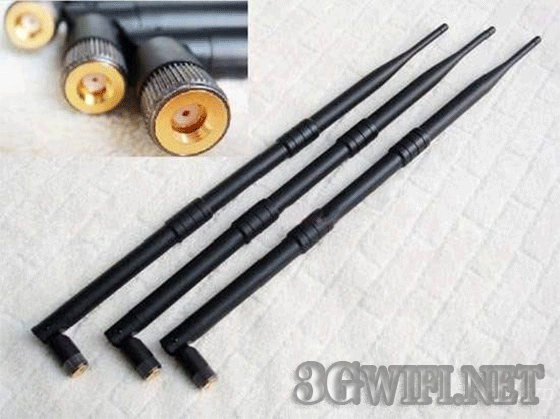 Wifi antenna
You can also increase your wifi broadcast range by replacing it with a better antenna. Normally, the modems or routers provided will have moderate antennas and a limited broadcast range, not to mention poor quality antennas, or damaged antennas during use. If your antenna is detachable, you can absolutely do that.
Conclusion : Above are some small tips for you to easily optimize your 4G wifi router. Please regularly check your modem and wifi router for any issues and quickly contact your network provider to have them check and warranty it for you.
Article edited and updated on 01/14/2020





