


 English
  Tiếng Việt
 Limited Wi-Fi is an error that prevents you from accessing the internet, which is annoying and inconvenient for most of you experiencing this situation. So, how to fix the "Limited Wi-Fi" error? Let's fix this problem with 3G wifi.Wi-Fi Limitedlet's fix this problem with 3G wifi.
How to fix the "Limited Wi-Fi" error and not access the internet
Method 1: Check the placement of the Wi-Fi modem
This is often the first error that causes your Wi-Fi connection to your device to be limited. Please check where you placed it and reposition it correctly. Place the Wi-Fi router in a well-ventilated area without obstacles. Even a partition like a wall can cause the Wi-Fi signal to be limited. If you are the only one using it, place the Wi-Fi in a location closest to where you use your computer or phone.
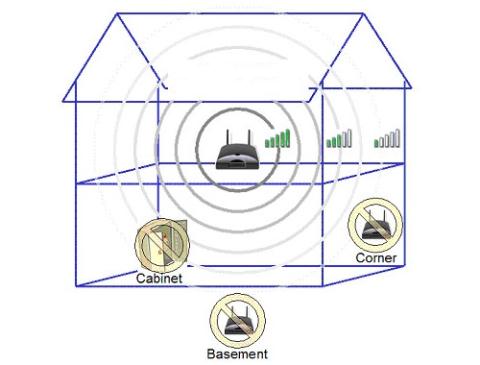 Place Wi-Fi in a well-ventilated or central location in the house
Method 2: Check your computer or network-connected device
Check if your computer or phone has any problems. Usually, computers often encounter errors that cause Wi-Fi to be limited due to a damaged Wi-Fi drive or Wi-Fi card. Please check if your Wi-Fi drive is damaged and reload the Wi-Fi drive.
>>> You might be interested in:Cheap 4G Wi-Fi routers
On phones, the main error that causes your phone to be limited when connecting to Wi-Fi is due to the battery saving mode. In this mode, the network will be limited to save battery power for you. If you are using battery saving mode, please turn it off.
Another possible error on phones is due to a full cache. You can clear the cache or completely disconnect the current Wi-Fi connection and reconnect.
Method 3: Check the Wi-Fi modem for errors
If you have checked the above two methods and found no errors, proceed to check your Wi-Fi modem to see if it is the main cause.
Here, you can do this by plugging the LAN cable directly from the modem to your computer. If there is no connection, it means there is a problem with the network or the modem. If you don't know how to fix modem issues, it's best to contact your internet provider for assistance.
If the network connection is still normal, it's either that your antenna has a problem, or the modem settings are faulty. You should update the modem's driver or reset the modem. Alternatively, you can equip it with a new antenna.
Conclusion:These are some small tips, hopefully, you can apply them effectively to fix the limited Wi-Fi error.
The article was edited and updated on 01/14/2020





