


 English
  Tiếng Việt
 Bạn đặt mật khẩu wifi nhưng quên mất không nhớ nó là gì hoặc là bạn muốn tìm một mật khẩu wifi bất kì. Đừng lo lắng hãy xem how to break wifi password thành công 100% trong bài viết này nhé. Rất đơn giản ai cũng làm được thôi.
Cách phá mật khẩu wifi đơn giản nhất
Mình đã tham khảo rất nhiều các bài viết chia sẻ về cách hack password wifi để sử dụng free nhưng mình tổng kết và biết được một số cách hữu ích nhất đó là:
Nếu gần nơi bạn ở có quán cà phê hay quán nét mà có wifi bạn chỉ cần mang điện thoại và bỏ chút tiền ra để uống cà phê hoặc chơi nét sau đó xin pass wifi để sử dụng như vậy chỉ cần chút tiền bạn đã có ngay wifi để xài chùa rồi đấy nhé.
>>> Không cần phải dùng ké wifi của người khác khi đã có: 4g sim wifi router
Nếu ở gần với nhà nghỉ, khách sạn vậy phải làm sao để có thể lấy được wifi ở đó bởi đã là sinh viên thì làm sao có tiền mà và nhà nghỉ, khách sạn qua đêm chứ. Nhưng có một cách rất hay đó là lấy số điện thoại của nhà nghỉ khách sạn đó và bảo mình là khách thuê phòng muốn vào wifi tại đó nhưng không biết password như vậy bạn đã biết password của nhà nghỉ/khách sạn tại đó mà chẳng mất một đồng nào nào rồi đấy nhé. Nhưng cách này bạn chỉ có thể áp dụng một lần thôi đấy.

Còn phương pháp sau đây đi vào vấn đề chính dành cho các bạn yêu thích công nghệ đó là cách phá mật khẩu wifi.
Thử dùng mật khẩu mặc định của modem wifi
Đa số gia đình nào cũng lắp wifi sử dụng mà họ không ý đến pass modem wifi. Đa phần người lắp đặt wifi sẽ để mặc định của modem. Bạn có thể kết nối vào modem để biết được mật khẩu wifi dễ dàng.
Thường hầu hết người dùng bình thường đều để mật khẩu wifi mặc định do nhà mạng cấp. Bạn có thể tìm những mật khẩu này ở các diễn đàn công nghệ. Lưu ý là bạn biết được mật khẩu modem wifi thì đừng có chọc phá nhé.
Sử dụng ứng dụng Wifi Chùa
Wifi Chùa sẽ cung cấp cho bạn hơn 100.000 địa điểm trên khắp thế giới mà họ có sẵn dữ liệu password Wifi của những nơi đó. Khi đến 1 địa điểm có sóng Wifi, bạn chỉ cần bật ứng dụng lên, nếu password Wifi của nơi đó có trong dữ liệu của Wifi Chùa thì sẽ kết nối được, còn không thì đành phải dùng cách dưới đây.
Sử dụng phầm mềm để dò mật khẩu wifi
- JumpStart (+Dumpper 40.1 Es)
- Dumpper 50.5

Extract the downloaded package and then run the file JumpStart Setup to proceed with the installation. After the software is installed, right-click on the icon in the system tray and select the Close option. Next, run the Vietnamese file to complete the process. However, remember to close the running software in the background before running the file.
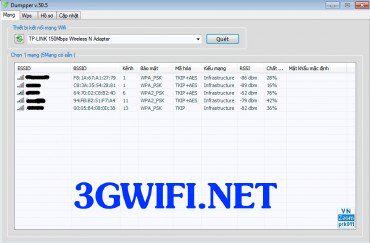
Next, select the "Wps" tab, then perform the actions as shown in the image below, and then click on all Wi-Fi networks for the software to scan for nearby Wi-Fi.
>>> You may be interested in: Huawei 4G Wi-Fi router
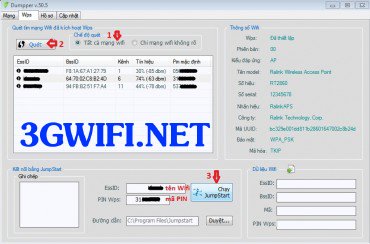
Click on any Wi-Fi name with the strongest signal and position number 3 to run JumpStart. If a dialog box appears, click continue.
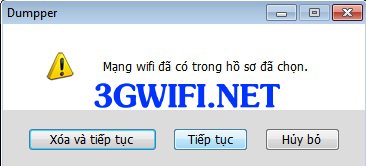
Then, the JumpStart software will start automatically and complete in less than 2 minutes.
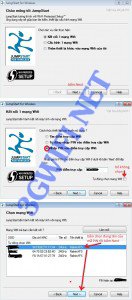
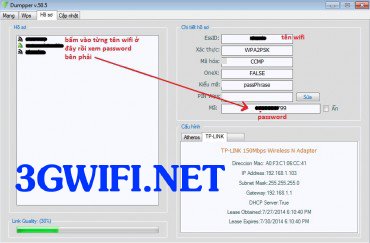
If the software cannot find and crack the Wi-Fi password, don't get discouraged. Choose another Wi-Fi and repeat the process. To view the password, click on the profile tab, then click on each Wi-Fi name to see the Password on the right side. Remember to record these passwords for use.
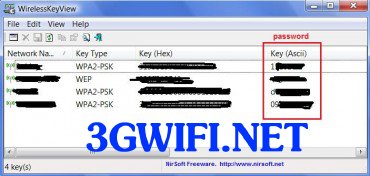
If the password is displayed as a series of hexadecimal numbers, you will need to use WirelessKeyView from Nirsoft. This software displays encrypted Wi-Fi passwords on your computer.
If you cannot find the Wi-Fi password automatically, try finding it manually. This involves using the PIN code found in Wi-Fi from the WPS tab. To find it manually: Run the Jumpstart software, click next, and follow the steps in the image below.
Click to enter the PIN into the Wi-Fi address you want to access. Uncheck the automatic Wi-Fi selection option. Now, go back to the WPS tab of the Jumpper software, click to copy the PIN from the WPS Pin box, paste it into the PIN for the access point field in JumpStart, and click Next.
In the next dialog box, click on the Wi-Fi name corresponding to the PIN. If you don't see it, click refresh to find it. Then, click Next and wait for it to scan. It will connect to the Wi-Fi immediately once it finds the password, and then you can go back to the profile tab on the software Dumpper to find out the wifi password.

If you are successful, continue with the remaining PIN codes and the JumpStart software has other functions that you can explore further. For Win 8.x, in the WPS dialog box, once scanned, you will know the PIN code and can enter that PIN code to connect to the wifi. As shown in the image below, click on the network icon on the screen, then double-click on the desired wifi to get the PIN code, then enter the PIN code and click next to wait until the connection is successful.

This article is for your reference, please do not learnhow to break wifi password to hack someone, as that is not advisable at all. You should only use it sparingly. If you have the means, you should install internet or buy a mobile wifi hotspot to use.





