English
  Tiếng Việt
 3G Wifi Routeris a popular product nowadays, due to its outstanding features. However, noticing that many customers still do not know how to use this product, this article would like to send you readersinstructions on how to use and set up a 3G wifi router, specifically the Buffalo 3G wifi router.
Instructions to recognize indicator lights on Buffalo wifi router
Wireless light:
- Blue: Broadcasting wifi from 3G SIM
- Light off: Broadcasting wifi from RJ45 port (existing internet network router)
- Green: Repeating signal from a nearby wifi network
Battery light:
- Red: Battery < 10%
- Green: Battery 10 - 50%
- Blue: Battery > 50%
- Yellow: Charging, fully charged turns blue
DIAG light:
- Flashing red: Starting up.
- Yellow: Normal operation, with password set for wifi
- Off, Dark: Normal operation, no password set for wifi
How to set up Buffalo 3G wifi router
Step 1: Plug in power, insert Dock
- Plug the adapter into the power outlet and the dock.
- The Baffalo 3G WiFi router has had the battery and SIM card inserted. Insert the SD Card (if any). Then insert it into the dock.
- Connect the network cable from the computer to the RJ45 port on the Dock, note the switch on the right to LAN.
- Press the POWER button on top of the BUFFALO 3G WiFi Router and wait for the DIAG light to stop flashing red.
Step 2: Configuration Setup
- Open a WEB browser (Chrome, FireFox recommended)
- Enter 192.168.11.1 (If it doesn't work, try 192.168.13.1)
- Click Login. With Username = root, leave the password blank.
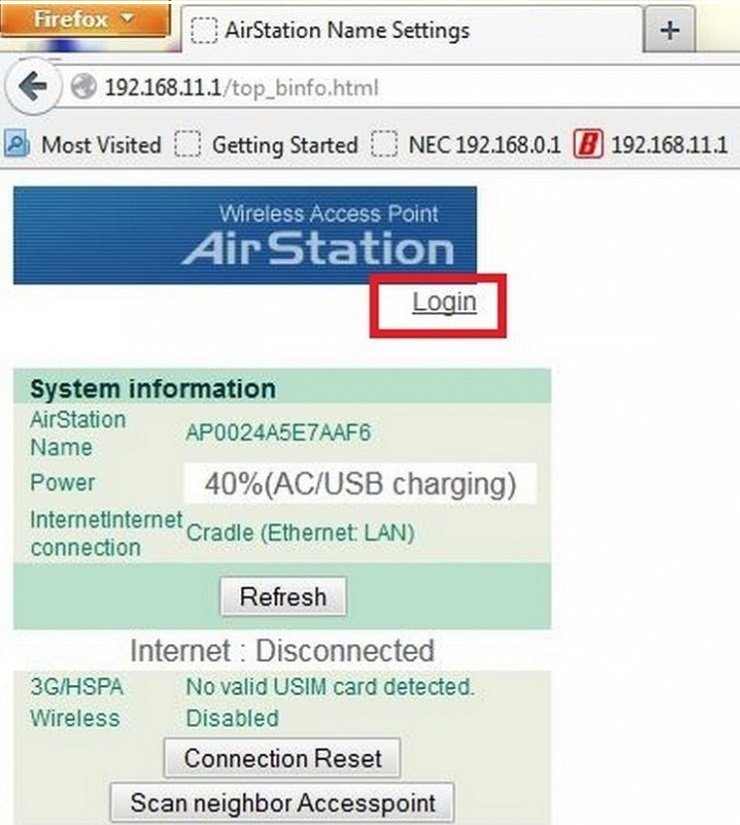
Instructions for setting up the baffalo WiFi router
Step 3: Select Internet/Lan. Under Internet (3G/HSPA). Fill in the Vietnamobile APN configuration as shown in the picture. Then scroll down and click Apply to finish.
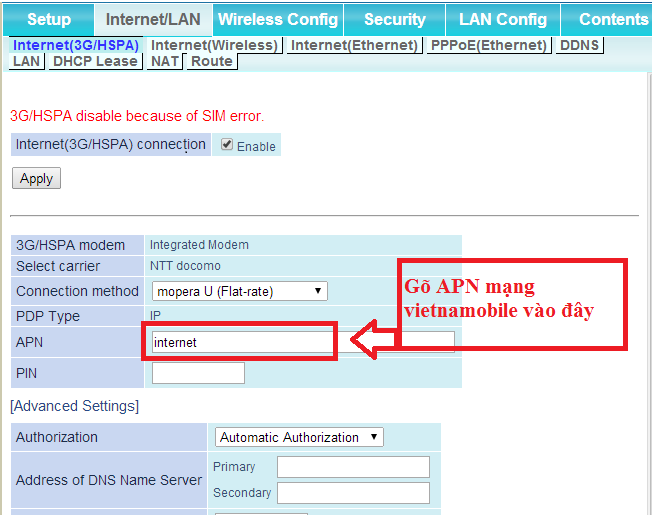
Instructions for setting up the baffalo 3g sim wifi router
Step 4: Completion.
- Remove the network cable from the computer. Remove the dock, remove the charger.
- The Wireless light is blue, the AOSS/DIAG light is yellow means success.
- Try connecting to the WIFI signal.
Buffalo 3G SIM WiFi Router is a3g sim powered WiFi router that uses battery power. You can charge it directly from the adapter without going through the dock. Wish you success!