


 English
  Tiếng Việt
 Watching videos, movies, and listening to music on youtube.com is no longer strange to many people, but to know cách tải video từ youtube và nhạc mp3 từ youtube về thì không phải ai cũng biết cách. Hôm nay 3G wifi xin hướng dẫn các bạn cách tải video và nhạc từ youtube về máy tính , android và iphone.
Cách tải video từ youtube
To download videos from youtube to your computer, do the following.
Ví dụ mình có video từ link youtube này https://www.youtube.com/watch?v=v5wb5R4SBGE
Nếu muốn tải video về máy rất đơn giản bạn chỉ cần thêm SS vào ngay đầu chữ youtube là được . Bạn thêm vào như sau.
- https://www.SSyoutube.com/watch?v=v5wb5R4SBGE
After adding as above, run the address, it will show the interface below. You can copy the link above and try it.
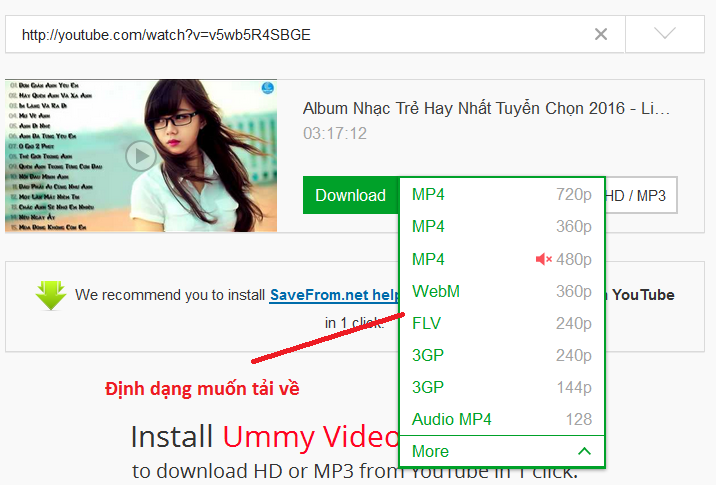 Tải video youtube
Here there are many video formats arranged by video quality from top to bottom for you to choose. Click download after selecting the format.
Hướng dẫn tải mp3 từ youtube
Để tải mp3 từ youtube cũng rất đơn giản bạn chỉ cần thêm vào listento vào đầu chữ youtube là có thể download mp3 về máy của bạn.
Still the same link as above http://youtube.com/watch?v=v5wb5R4SBGE
After adding, the link has the following address.
- http://listentoyoutube.com/watch?v=v5wb5R4SBGE
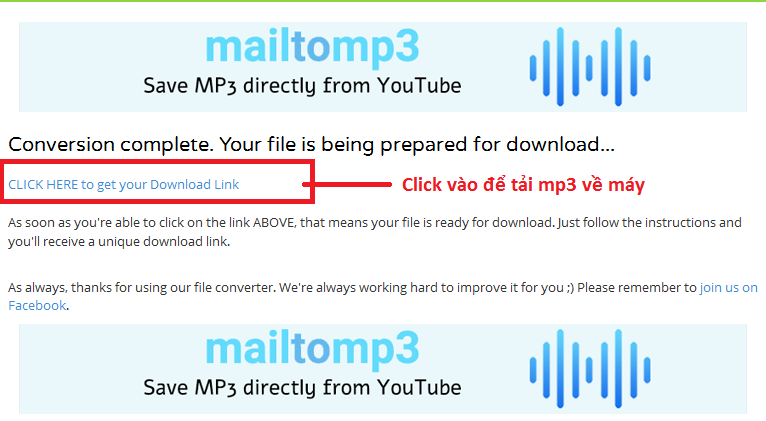
Download mp3 from youtube
Running the link will bring up the interface as above, please select Click here to get your download link to download to your computer.
To download on your phone, do the same as above. Regarding the cost of downloading mp3 and video on mobile phones, it will definitely consume a lot of data and money. To minimize those costs, you can use cheap 3G SIM cards at the following shop.
- Cheap 3G SIM big promotion
Or equip yourself with a 3g sim wifi hotspot to use more economically
Article was edited and updated on 14/01/2020





