


 English
  Tiếng Việt
 - 1. Ways to fix wifi devices with an exclamation mark
- 1.1. Method 1: Restart your wifi device
- 1.2. Method 2: Set a static IP for your computer, laptop, or phone
- 1.3. Method 3: Recreate dynamic IP address using cmd command
- 1.4. Method 4: Check the network cable plugged into the router
- 1.5. Method 5: Buy a new wifi router
- 1.6. Video tutorial on how to fix wifi limited access error 100% successfully
Your wifi device is having trouble connecting to the network, which affects your daily work and life to some extent as many devices are linked to the internet. Indeed, losing internet connection is quite troublesome as all your activities seem to be interrupted, especially in today's technological era.
There are many reasons for wifi errors, and if you are facing this problem and cannot find a way to fix the wifi error to continue accessing and using the internet, the article below will guide you on How to fix wifi with an exclamation mark. Check it out now.

Your wifi has an exclamation mark and how to fix the error
>>>Do you want high-speed wifi with unlimited data? Use our service:Wifi hotspot rental
Ways to fix wifi devices with an exclamation mark
Method 1: Restart your wifi device
This should be your first option when the wifi is faulty. You need to unplug all devices connected via LAN cable to the router. Then press the reset button to restart the device or unplug the power.
After about 30 seconds, turn it back on and wait for the wifi router to finish booting up. Then reconnect your device to see if it works. Most of the time, after restarting, you will be able to access the internet normally again. This is because sometimes the wifi error 'limited access' is caused by too many devices accessing the wifi network, overwhelming its capacity.
Restarting the Modem is the first method you should try
Method 2: Set a static IP for your computer, laptop, or phone
Setting a static IP is a quite effective way to fix the Wi-Fi exclamation mark error. The steps are as follows:
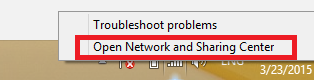
Step 1: First, perform the action of clickingOpen Network And Sharing Center.
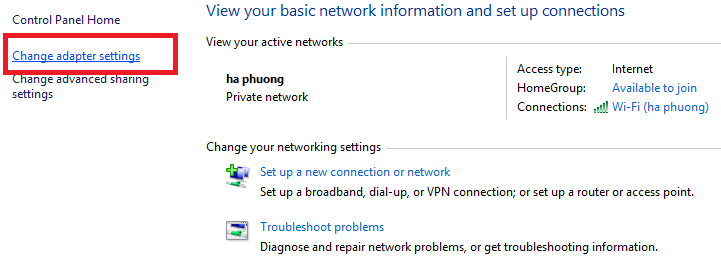
Step 2: Next, selectChange adapter settings".
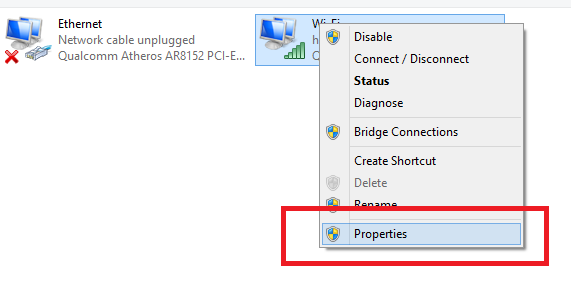
Step 3: Right-click on the connected Wi-Fi network iconProperties.
Step 4: Select the iconInternernet Protocol Version 4 (TCP/IPv4).
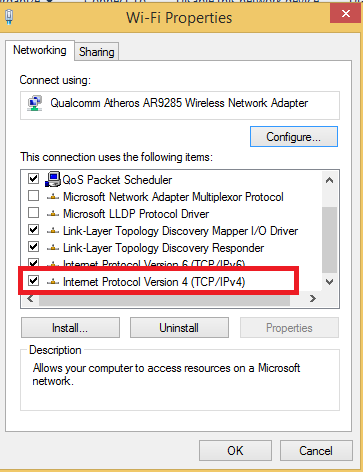
Step 5: Next, select the itemUse the following IP addressto set up a static IP.
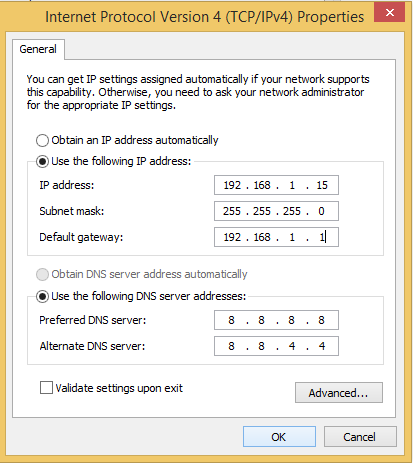 Set up static IP for the computer
In the Use the following IP address section, you can set it up as follows.
- IP Address 192.168.X.Y (Y is an optional number, as long as it's different from the IP of other machines).
- Subnet mask: 255.255.255.0 (Auto-filled)
- Default gateway: 192.168.X.1 (X can be 0 - 255 depending on your network modem).
In the Use the following DNS server addresses section, set it up as follows.
- Preferred DNS server: 8.8.8.8
- Alternate DNS server: 8.8.4.4
This is Google's DNS, you can also set it up if you cannot access Facebook when it is blocked. Note that you must set X the same, otherwise you will not be able to access the network. This method will be effective when your computer or phone has the same IP address as other devices.
Method 3: Recreate dynamic IP address using cmd command
This may seem quite difficult if you have never used cmd before. However, follow each step and you will be able to do it.
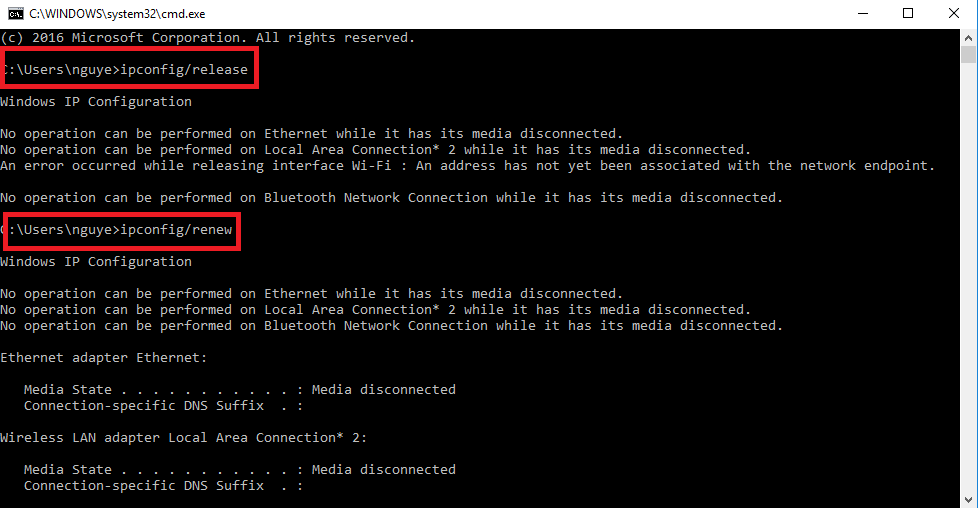
First, click on the Windows icon and type in the search bar. Or press the shortcut Windows + R. Then type the command cmd -> the DOS interface appears, type ipconfig/release and press Enter -> Continue to type the command ipconfig/renew and press Enter. Now try to reconnect to see if it works.
This command will help you create a brand new IP address for your computer. This is an effective fix for cases where Wifi has a limited access error.
>>>Want to use high-speed wifi with fewer glitches, see:4G wifi router
Method 4: Check the network cable plugged into the router
In many cases, the problem is not with the device but with a damaged network cable. Incorrectly crimped or loose network cables can easily cause this problem. You just need to try plugging in another network cable to know.
If it's the network cable, it's simple, you just need to re-crimp the connector or buy a new cable from the store. Then plug it in and you'll have wifi to use again.
Method 5: Buy a new wifi router
If you've tried everything and it doesn't work, your wifi router is broken. You can only fix software issues, but if it's a hardware error, you're out of luck. You should try another wifi router to see if it has the same problem.
If the error persists, you have to buy a new wifi router. Don't bother fixing the wifi router because it will just have problems again after a while. The price of a wifi router is not expensive, and it's not much more than the cost of repair.
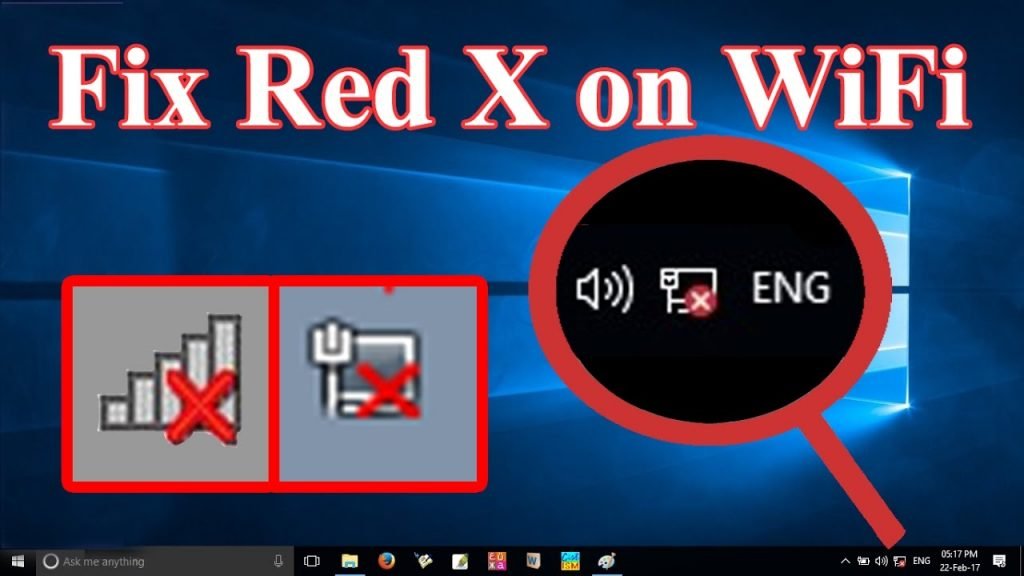
Here are the ways tofix wifi with a !. Apply these methods to fix the wifi limited access error on your phone, computer, laptop.





