


 English
  Tiếng Việt
 - 1. How to make calls and send messages when using MobiFone international roaming
- 2. Turn on/off MobiFone international roaming on your phone
- 3. How to access GPRS when roaming internationally
- 4. How to look up and check the CVQT MobiFone service you are using
- 5. Some frequently asked questions when using the service
You are a MobiFone subscriber and have registered for the international roaming service to use abroad. However, you have many questions the first time you use it. Please see the guidesetting up MobiFone international roaming on your phone below.
How to make calls and send messages when using MobiFone international roaming
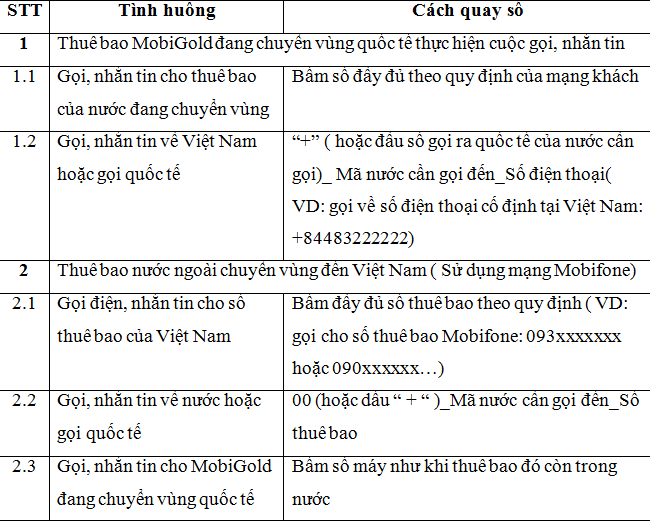
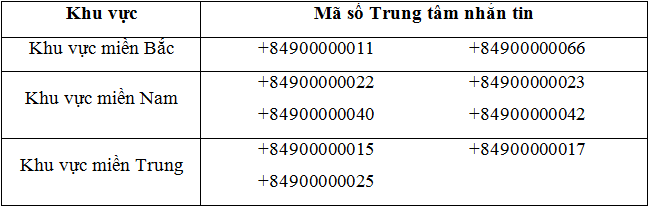
Note:The SMSC (SMS Center) needs to be changed to one of VMS's active SMSCs. Specifically, you can refer to the table below.
>>> You are using the service, so you should be familiar with: MobiFone international roaming charges
Turn on/off MobiFone international roaming on your phone
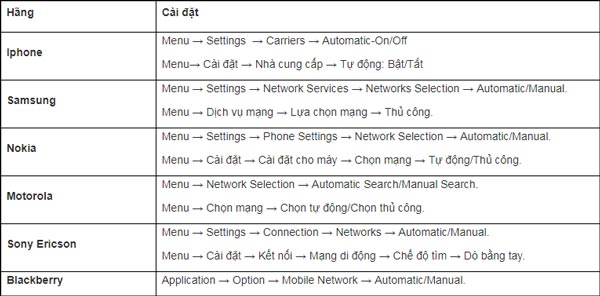
You can refer to how to turn international roaming on/off for 3 types of phones: iPhone (iOS), Blackberry, and HTC (Android). Turning on international roaming on other phones is similar.
Customers can choose one of the following two network access methods:
- Method 1:Automatic setup (Auto): select Menu → Setting → Select Network → Auto.
- Method 2:Manual setup (Manual): select Menu → Setting → Select Network → Manual → Select the network to use from the list → OK.
How to access GPRS when roaming internationally
- For networks with a GPRS agreement with MobiFone, you can use the GPRS service.
- Customers configure the APN as follows to access GRPS:
For iOS devices: Settings Mobile Data Mobile Data Network APN APN Settings:m-world.
For Android devices: Settings Mobile Network Access Point Names APNs APN Settings:m-world.
Please refer to the table above and apply it to the phone you are using. Now you know how to use MobiFone's international roaming service. If anything is unclear, please watch the video below.
Video tutorial on using Mobifone's international roaming service
How to look up and check the CVQT MobiFone service you are using
For more details, please call the MobiFone hotline at 9090. Additionally, MobiFone provides an inquiry utility for International Roaming Service information for customers traveling abroad. Customers can compose messages according to the following syntax and send them to 994 to look up information (free in Vietnam, SMS sending charges apply when abroad):
- To look up service information, compose: CVQT, Roaming, CVQT TBTT, CVQT TBTS;
- To look up service charges, compose: (COUNTRY NAME);
- To look up service packages and utilities, compose: Roam Like Home, SMS Roam Saver, Dong Duong, Callme, Maybay.

After you return to your country, please cancel Mobifone roamingto avoid incurring charges or complications. Don't forget this.
Some frequently asked questions when using the service
- When I roam abroad, can I text service numbers (7xxx, 8xxx...)?
MobiFone does not provide service to domestic short service numbers when roaming internationally. Therefore, you cannot text those numbers.
- I am roaming internationally in Japan. Why can't I make a call by dialing 0084?
The exit code "+" is the standard international exit code applicable to all carriers. Exit codes 00, 01,... are specific exit codes of foreign carriers. Japan does not support the exit code 00, so you cannot make the call. To make a call, simply press +84 and then the number you want to call.
- My subscription is currently using MobiFone's domestic Data packages. Will these packages still be usable when I roam internationally abroad?
Domestic Data packages cannot be used abroad. When you use Data services, you will be charged the international roaming rates as stipulated by MobiFone.
- How do I know if my phone has successfully roamed to a partner network?
Your mobile phone will display the partner network name, and you will also receive a message from MobiFone confirming the successful update of the international roaming network. For example, if you successfully connect to the Singtel network, your phone will display: SingTel or SingTel-G9.
- When I use international roaming in China, how can I access the network I want?
You can access the network manually: Select Menu → Setting → Select Network → Manual → Select the network to use from the list → OK.
- Can the phone I am using in Vietnam be used abroad?
MobiFone uses the 900/1800 (2G) and 3G bands. Therefore, your mobile phone can be used in most countries. However, some countries may use different bands, so you should note: - In the US and Canada: use a mobile phone with the appropriate band or enable 3G. - In Japan and South Korea: enable 3G to connect to CDMA technology networks.
Above are all the things you need to know about how to set up Mobifone international roaming on your phone. Wish you successful setup!
- In Japan and South Korea: turn on 3G to connect to the CDMA network.
Here is everything you need to know about setting up Mobifone international roaming on your phone. We wish you successful setup!





