


 English
  Tiếng Việt
 - 1. Giới thiệu chi tiết về Dcom 3G Viettel
- 2. Hướng dẫn cài đặt Dcom 3G Viettel từ A - Z
- 2.1. 1) Lắp SIM vào modem USB D-com 3G
- 2.2. 2) Inserting and removing MicroSD card into Dcom 3G Viettel
- 2.3. 3) Connecting the 3G USB Modem to the computer
- 3. Software installation guide for Dcom 3G Viettel
- 4. Some notes when using Viettel 3G Dcom
- 4.1. Video tutorial on how to top up Viettel 3G Dcom
Nhu cầu sử sụng multi-network 3G Dcom ngày càng tăng, còn rất nhiều người mới sử dụng còn bị bỡ ngỡ chưa biết cách sử dụng. Bài viết dưới đây sẽ hướng dẫn chi tiết nhất về cách sử dụng dcom 3g Viettel, chắc chắn sẽ giúp bạn rất nhiều. Hãy chia sẻ tới bạn bè của bạn để họ cùng biết nhé.
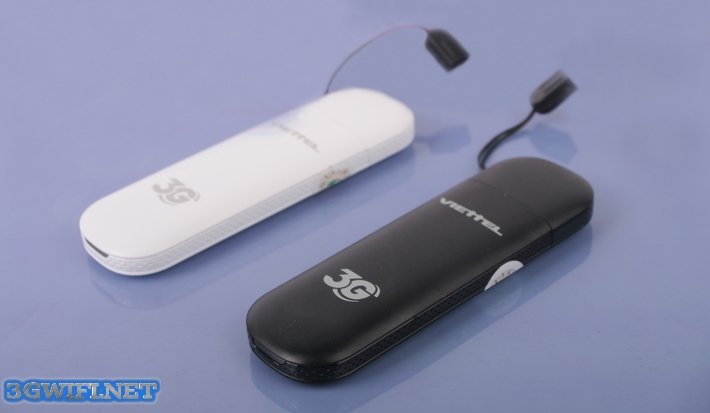 Dcom 3G Viettel D6602 with huge promotion
Giới thiệu chi tiết về Dcom 3G Viettel
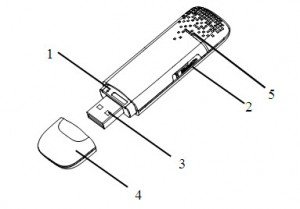
Chi tiết dcom 3g Viettel
1) Khe cắm thẻ USIM/SIM
2) Khe cắm thẻ nhớ MicroSD Card
3) Cổng USB
4) Nắp Modem
5) Hiển thị trạng thái hoạt động của modem.
Hướng dẫn cài đặt Dcom 3G Viettel từ A - Z
1) Lắp SIM vào modem USB D-com 3G
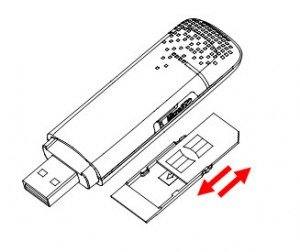
Hướng dẫn cài đặt dcom 3G Viettel
+ Trước tiên bạn tháo nắp Dcom 3G, rút mảnh nhựa gắn SIM ra khỏi D-com. Be careful not to pull hard and suddenly, as this may break the SIM plastic holder.
+ Then insert the SIM into the plastic piece as shown above.
+ Insert the plastic piece into the SIM card slot of always with you wherever you are
To remove the SIM from the Dcom 3G modem:
+ Remove the USB cover
+ Gently pull the plastic piece with the SIM attached out of the SIM card slot until you hear a click.
+ Remove the SIM/USIM from the plastic piece and reinsert the plastic piece into the USB.
2) Inserting and removing MicroSD card into Dcom 3G Viettel
Follow these steps:
+ Open the cover of the card slot. Note that you should not pull the cover too hard, as it is permanently attached to the modem.
+ Insert the memory card into the MicroSD slot. When you hear a click, it's done.
+ Close the memory card slot cover, and you can use the memory card via the 3G USB Dcom (The MicroSD card will be automatically installed when you install the modem on your computer).
3) Connecting the 3G USB Modem to the computer
+ Plug the USB Dcom 3G into your computer's USB port.
+ The operating system (Windows) will automatically recognize the new hardware and then begin the installation.
Software installation guide for Dcom 3G Viettel
For Windows operating systems, the system will automatically start the software installation process when you connect the Dcom to your computer.
If the system does not automatically install the software, you can install it as follows:
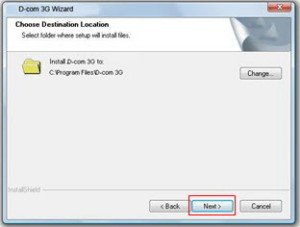
1) Connect the device to the computer's USB port. The installation software will automatically appear on the computer screen, then select the Install.exe file. Click “Next”:
2) Select “I accept the terms of the license agreement:” and click “Next”
3) Select “Next” if you do not change the installation directory on the hard drive
4) The installation process begins
5) The software is installing drivers for the device
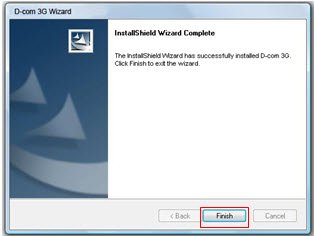
6) Click the Finish button to complete the installation process.
Some notes when using Viettel 3G Dcom
+ To safely remove the modem from the computer, close the modem management software first, then remove the modem from the computer.
+ Do not use wireless devices on airplanes, at gas stations, near flammable gases, near flammable or explosive products, and in hospitals or near medical equipment. Read and follow the safety instructions and turn off your modem in those situations.
+ Keep the modem out of reach of children. 3G Dcom can cause injury if used as a toy.
+ Viettel 3G USB is not waterproof, so keep the modem in a dry and cool place, avoiding direct sunlight.
+ Handle the 3G Dcom carefully. Do not drop, bend, or impact it strongly.
+ Viettel 3G Dcom can operate in the temperature range of -10°C ~ +55°C and humidity of 5%~95%.
With a few simple steps, you can effectively use your Viettel 3G Dcom device, now just sit back and enjoy. Good luck





