


 English
  Tiếng Việt
 - 1. Causes of weak wifi
- 2. How to fix weak wifi quickly
- 2.1. Place the router in a different location
- 2.2. Video on how to check and fix slow and weak wifi
- 3. Restart the wifi Router
- 4. Controlling the network bandwidth is a way to fix weak Wi-Fi
- 5. The antennas of your Wi-Fi router may be causing Wi-Fi signal interference
Internet connection via wifi is a necessity for many people. Nowadays, wifi is no longer too strange to everyone, every family, company, school has wifi coverage everywhere. Your house has a wifi router, but the wifi is very weak. So how to fix this problem? All will be answered by us in the following article about how to fix weak wifiright after this.
Causes of weak wifi
There are many reasons why wifi is weak. Here are some common reasons for this condition that we have compiled.
- Due to damage to the wifi transmitting device during use.
- Weak wifi can be caused by many people accessing and using it at the same time.
- The placement of the wifi device is unreasonable, causing the wifi receiving device (phone) to be unstable.
- Due to the settings on your phone

Many reasons cause weak wifi
How to fix weak wifi quickly
Here are some solutions to fix weak wifi that you can implement:
Place the router in a different location
When the staff came to install the internet service for your family, they often left a lot of wires to be able to customize the position as conveniently as possible. Usually, there will be criteria to ensure WiFi signal quality, including not placing it next to metal objects, placing it as high as possible, and ensuring minimal obstacles between the device and the router.
Pay special attention to household appliances that generate large magnetic fields such as refrigerators, TVs, microwaves… which can cause signal interference, affecting transmission quality. The height should also be ensured for easy replacement and installation of new equipment.
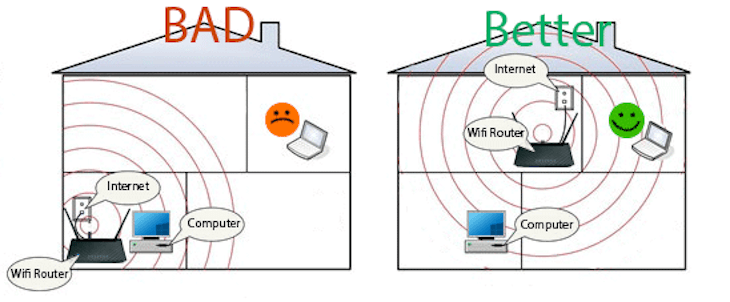
Please place the Router in a suitable place
Video on how to check and fix slow and weak wifi
Restart the wifi Router
This is something you might consider when your wifi connection is quite poor. This is even one of the tricks that the technical staff tell you every time you complain about slow wifi.
The Wi-Fi router will heat up during prolonged use, leading to a significant decrease in transmission intensity. Give the router a break by turning off the power or unplugging it for about 2 minutes. Then turn the Wi-Fi back on to reset everything.
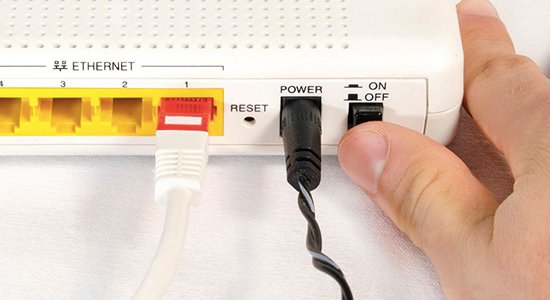
Restart the router
Controlling the network bandwidth is a way to fix weak Wi-Fi
Hearing this, many people wonder how to control bandwidth. This is simple, just check everyone in the house, see if anyone is downloading movies or games?
This action will help limit the load on the internet connection by requesting them to stop downloading. After doing this, check if the Wi-Fi connection speed has improved at all.

Check the bandwidth again
The antennas of your Wi-Fi router may be causing Wi-Fi signal interference
Your Wi-Fi router might have 2 antennas but pointing them in the same direction can cause interference. For devices with 3 to 4 antennas, pointing them all in the same direction also causes interference, leading to weak Wi-Fi. Fixing weak Wi-Fi is very simple.
You just need to point the antennas in opposite directions. For devices with multiple antennas, point two antennas in opposite directions on the sides, and point the remaining antennas upwards.
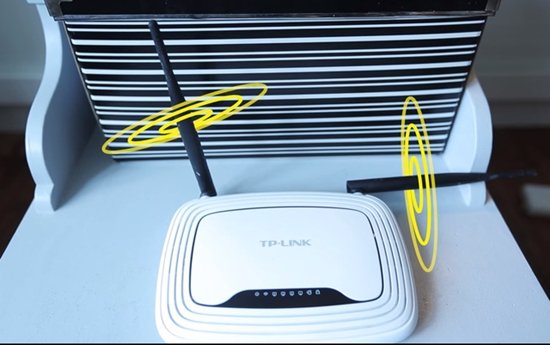
We hope the information we've provided above will certainly help you in fixing weak Wi-Fi. Try different methods to get the best results. Good luck.





