


 English
  Tiếng Việt
 Did you know that a laptop can be a dedicated wifi hotspot? In this article, we will guide you on how toturn your laptop into a wifi hotspot with extreme simplicity and effectiveness. You only need the help of the toolPCTuneUp Free WiFi Hotspot Creator.
 Software to broadcast 3g wifi from a laptop
Free WiFi Hotspot Creator - Easily broadcast 3G WiFi from a laptop
PCTuneUp Free WiFi Hotspot Creator is a free software that allows users to create a WiFi connection by turning their laptop into a wireless3g wifi router. In addition, this program also allows users to name and set privacy for the newly created WiFi connection. You can set a password so that only those who enter the correct password can access the Internet through this connection.
>>> You may be interested in: cheap 4G dcom
After installation, launch the software. Proceed to name and password the WiFi connection.
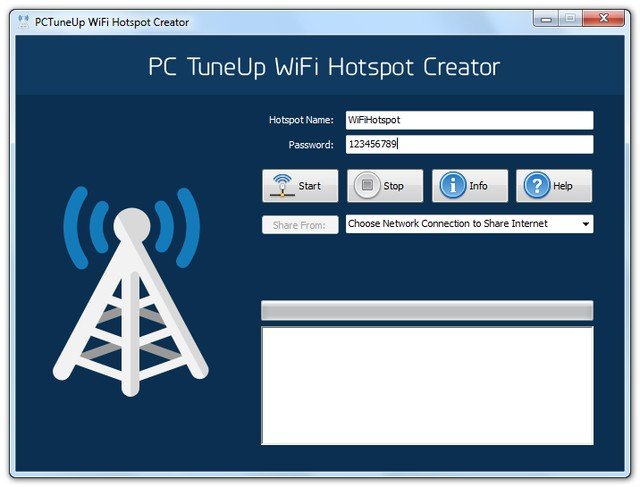 Broadcast wifi from a laptop
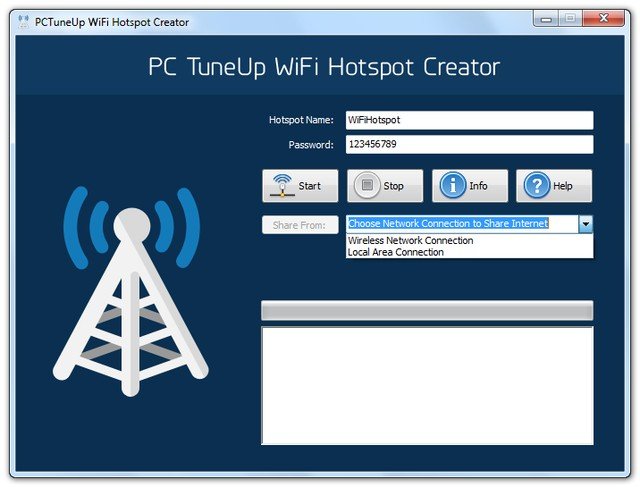
Next, proceed to select the connection you want to create: DSL, Cable, Bluetooth, Mobile Broadband Card, Dial-Up.. As the content is about sharing WiFi, we will choose Wireless Network Connection
Ok, now press Start to begin using the laptop as a WiFi hotspot.
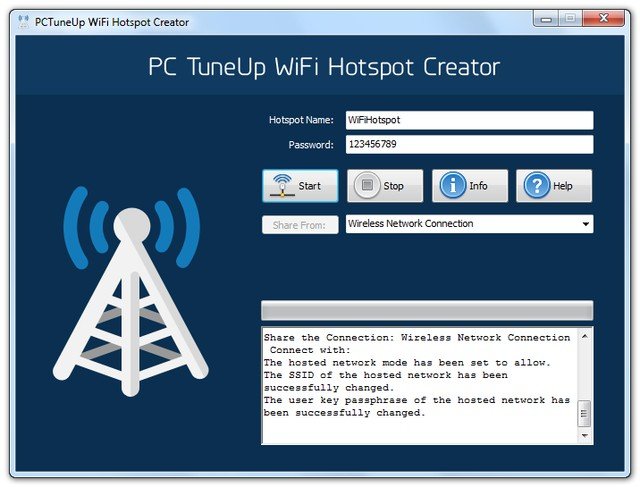 3G wifi broadcasting software for laptops
HowPCTuneUp Free WiFi Hotspot CreatorIt's that simple. Interested readers can download and experience it here
>>> Summary of thebest and cheapest 4G SIM Wi-Fi routers available today
Note: Access points from hotspots are only for light and non-professional use. If you use them frequently, you still need aprofessional 3G Wi-Fi deviceArticle revised and updated on 12/05/2018
Bài viết đã được chỉnh sửa và cập nhật ngày 12/05/2018





