


 English
  Tiếng Việt
 Renting travel wifi is very popular in Vietnam today. When traveling abroad in groups, everyone chooses to rent travel wifi. If you are a first-time user, please read carefullyhow to use travel wifito use it most effectively!
Simple and effective way to use travel wifi
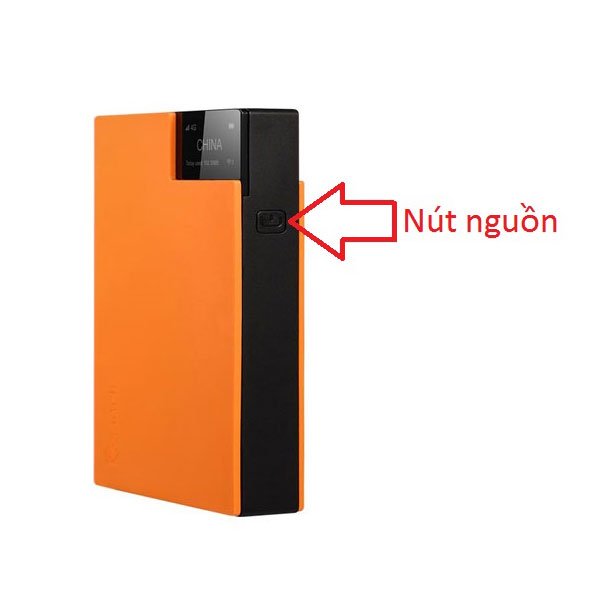
Sahaha R9 just needs to be turned on to use without any setup
The travel wifi device will be pre-configured when delivered to you. You just need to turn it on and use it without having to set anything up. Here's how to use travel wifi:
- Press and hold the power button for 3 seconds to start the device and connect to the network in that country.
- After the device screen turns on, you will see the country name, signal bars, network signal, and battery level. Continue to press the power button once to see the Wi-Fi name and password.
- Simply go to Wi-Fi and enter the password to access. Connecting is the same as regular Wi-Fi. The Wi-Fi name will be in the format SSID: RoamWiFi-XXXXXX.
- When you want to turn off the device, press and hold the power button for 3 seconds. The device will then turn off automatically.
- If you want to reset the device, just press and hold the power button for 15 seconds and wait for the device to restore default settings.
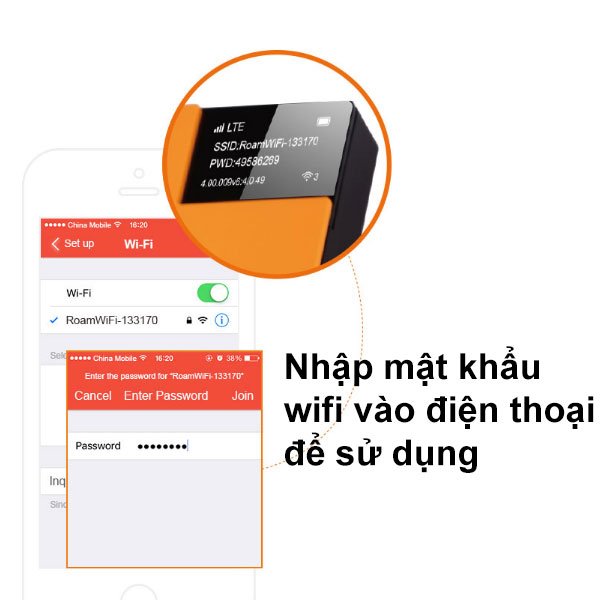
Just enter the password and you have Wi-Fi to use comfortably
>>>Get your overseas Wi-Fi device now, covering up to 100 countries, no SIM needed: Sahara R9
Notes for effective and economical use of travel wifi
- The Sahaha R9 portable wifi device (5000 mAh battery) can be used continuously for 12 hours. A full charge takes 6 hours. It is recommended to fully discharge and then fully charge the battery each month before use.
- You can check the remaining battery status on the screen. You need to use a USB cable to recharge the device. The device can be charged via a power bank; phone or iPad charger; laptop... The device uses a power source of 5V - 1A.
- When you are not using the Wi-Fi, you should turn it off to save battery. You don't need to worry about turning it off and on multiple times affecting the device.
- In the bottom right corner of the screen is the number of connected users. You can see how many people are currently using Wi-Fi from the device. Sahaha R9 can provide Wi-Fi to 5 devices simultaneously. If this limit is exceeded, the Wi-Fi network will become laggy and slow.
- In the top left corner of the screen is the network speed display of the connected device. The higher the signal bar, the better the network speed.
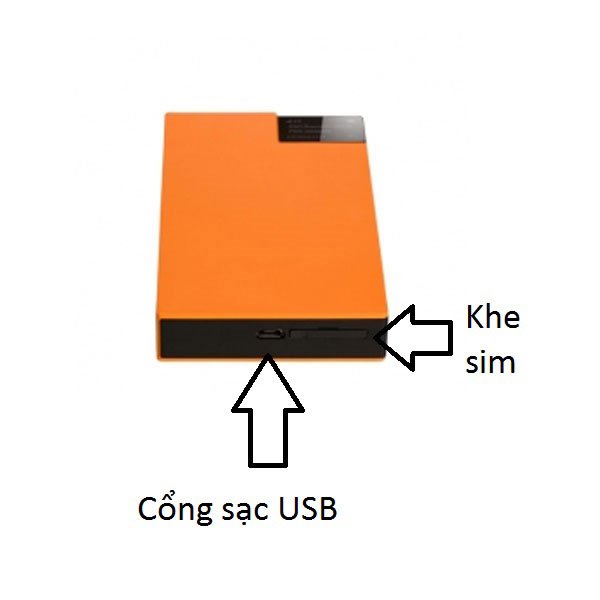
How to install a 4G SIM for Sahaha R9 Wi-Fi hotspot
>>>Use high-speed unlimited internet on your long trips with the service: Travel Wi-Fi rental
- The device also has a SIM slot for you to insert a SIM card. In countries where 3G/4G SIM cards are cheap, you should buy a SIM card to save costs.
- Do not expose the device to high humidity, water, or liquids.
- Do not expose the device to high temperatures or fire. The normal operating temperature of the device is from 0o- 45o°C.
- Do not throw, drop, or destroy the device. If you no longer wish to use it, please dispose of it in the trash.
So, this concludes the guide on how to use Sahaha R9 travel Wi-Fi. We wish you effective use of the device and enjoy its wonderful features.





