


 English
  Tiếng Việt
 Step 1: Connect to Hame wifi using Laptop or phone. Enter the wifi password.
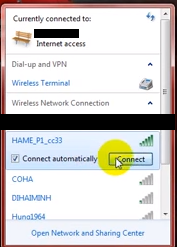
Select Hame wifi connection
Step 2: Open the browser and enter the address 192.168.169.1 Then click the lock icon to log in.When the password input box appears, enter: hame
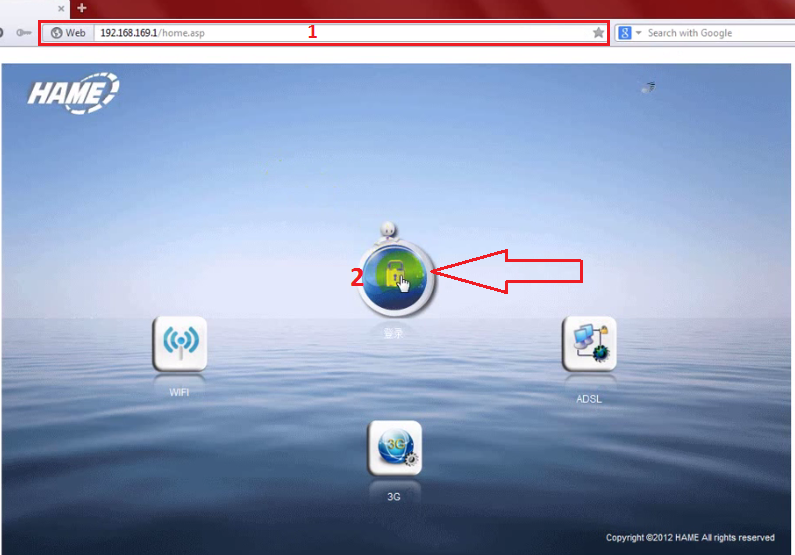 Select the lock icon and enter hame
Step 3: On the control screen, select
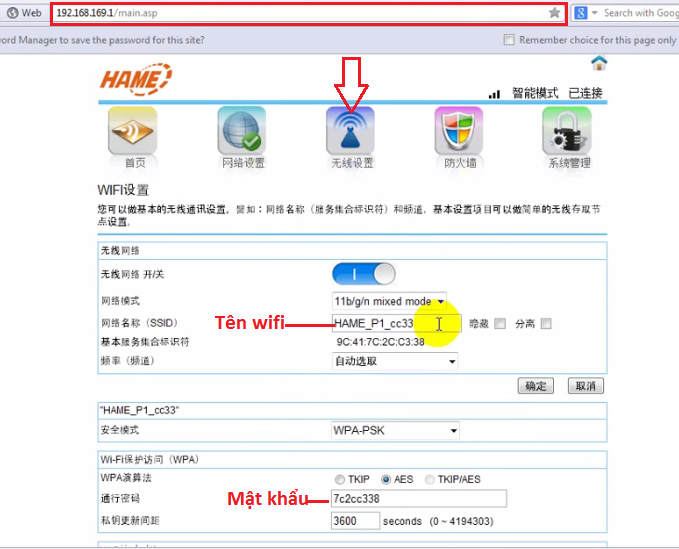
Select the wifi name and password to change them as you wish (note: the password must be at least 8 characters).
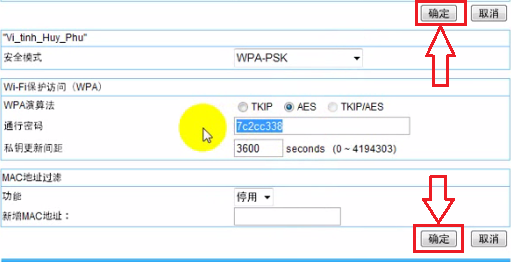 Next, select as shown in the image to complete
Just like other 3G Wifi Hotspot products, the 3G Sim wifi hotspotHame also has all the features and uses of a regular 3G wifi hotspot.Hame 3g wifi hotspotthis helps customers access the Internet anytime, anywhere without any obstacles.
=>> See detailed informationHame 3G wifi hotspothere.
The article was edited and updated on 14/01/2020





