


 English
  Tiếng Việt
 Below is a guide on how to register, install, and configure Viettel 3G network in the simplest way that anyone can do. 3G wif will guide you in detail below, please follow each step to know how to register Viettel 3G as well as how to configure and install.

>>> If you find the network operator's packages insufficient, please: buy a Viettel 4G SIM
How to register Viettel 3G service
3G registration syntax for Viettel network
To register, text to Viettel hotline:
- [Tên gói gửi] to 191
Below is the price list for Viettel 3G packages:
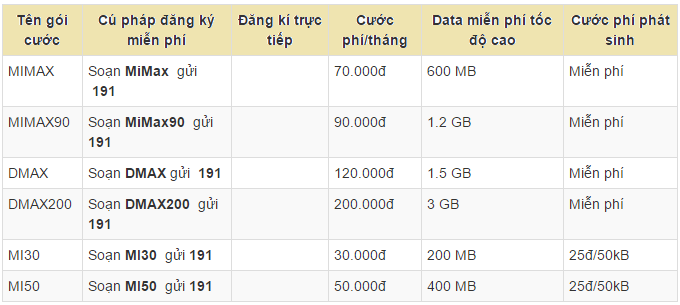
Viettel 3g package table
Note:
- For the Mimax package, there will be 2 types of packages.
- Student packages will cost only 50,000 VND
- while the regular Mimax package will cost 70,000 VND.
- The subscription cycle is 30 days. After 30 days, the switchboard will notify you to renew.
How to install and configure Viettel 3G on your phone
Setting it up is also very simple. After subscribing, restart your device so it can integrate 3G, as this is an important factor, not all devices support the automatic 3G nhận feature after subscribing.
- Setting up Viettel 3G on iPhone
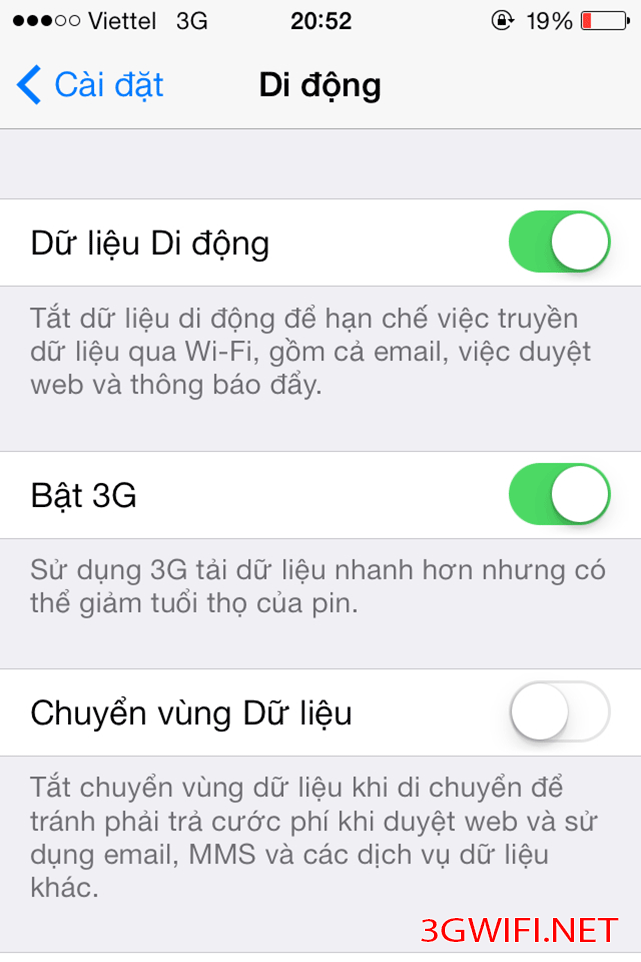
Setting up Viettel 3G on iPhone
- Setting up Viettel 3G on Android devices
Swipe your phone screen from top to bottom or bottom to top, depending on your phone, to see the 3G on/off application.
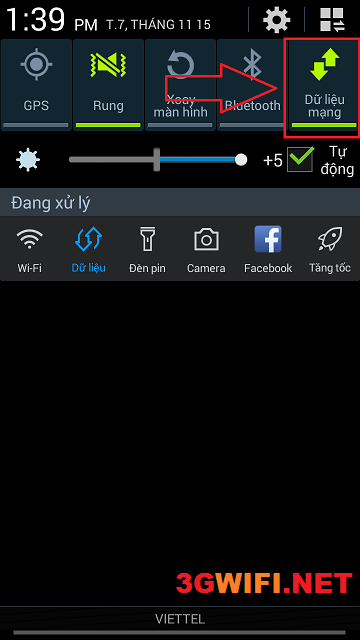 Turning Viettel 3G on/off on Android
Additional notes:If you don't need to use 3G, you should pay attention to this. When you stop using 3G, Viettel's switchboard will switch you to the default package, which is very expensive. Therefore, you should turn off the 3G network.
Viettel 4G network is now available. Viettel's 3G packages have been converted to 4G LTE. The subscription price and method remain unchanged. To use 4G best, please see:
- 4G WiFi hotspot cheap
If you need to use 3G/4G, subscribe to Viettel's cheap packages. Wish you success in subscribing and using.





